
本页内容
- 你必须了解的基本概念
- 准备工作
- 安装并配置 Prometheus(创建用户与目录、下载 Prometheus 预编译包、配置 Prometheus)
- 在目标监控主机上安装并配置 Node Exporter(下载并安装 Node Exporter、以服务方式在后台运行 Node Exporter)
- 将 Node Exporter 添加到 Prometheus 服务器
- 结语
- 创建用户与目录
- 下载 Prometheus 预编译包
- 配置 Prometheus
- 下载并安装 Node Exporter
- 以服务方式在后台运行 Node Exporter
Prometheus 是一个开源的监控和告警平台。
Prometheus 最初由 Soundcloud 于 2012 年创建。此后,Prometheus 项目被一些知名公司采用,并发展成为一个拥有非常活跃的开发者与社区的大型项目。2016 年,Prometheus 项目从云原生计算基金会(CNCF)毕业。
你必须了解的基本概念
简单来说,Prometheus 通过 HTTP 端点从目标服务器采集数据和 metrics(指标),然后将所有数据以时间序列的形式存储。在 Prometheus 中,时间序列数据通过指标名称和键值对来标识。
Prometheus 通过 Prometheus 查询语言(PromQL)提供了灵活性。你可以使用 PromQL 来查询 Prometheus 的时间序列数据库。
在目标服务器上,你必须安装用于向 Prometheus 暴露所有数据和 metrics(指标)的 'exporter'(导出器)应用。'Node Exporter' 是监控 Linux 机器时常用的一个 exporter。
Node Exporter 暴露来自 Linux 机器的硬件和内核相关的 metrics(指标)。它是一个单一的二进制文件,会向 Prometheus 服务器暴露数据和指标。
本指南将向你演示如何在 AlmaLinux 9 服务器上安装 Prometheus 和 Node Exporter。
准备工作
在开始之前,请确保你已具备以下条件:
- 两台 AlmaLinux 9 服务器 —— 本示例将使用独立的服务器分别运行 Prometheus 和 Node Exporter。
- 一个可以执行 sudo 获取 root 权限的非 root 用户。
安装并配置 Prometheus
Prometheus 是一个开源的现代系统监控与告警系统。它可以通过预编译包安装到传统的 Unix/Linux 服务器上,也可以使用 Docker、Kubernetes 等容器技术,或是 Ansible、Chef、Puppet、Saltstack 等配置管理工具来部署。
接下来的章节将向你演示如何通过预构建的二进制文件在 AlmaLinux 9 服务器上安装 Prometheus。
请按以下步骤完成 Prometheus 在 AlmaLinux 服务器上的安装:
- 创建用户与目录
- 下载 Prometheus 二进制包
- 配置 Prometheus 服务器
- 以 systemd 服务方式在后台运行 Prometheus
创建用户与目录
在安装 Prometheus 之前,你将在系统上创建一个新用户和若干目录。该用户将用于运行 Prometheus,而其中一些目录将用于存储 Prometheus 的配置文件和数据。
运行以下命令创建一个名为 prometheus 的新系统用户。
sudo adduser -M -r -s /sbin/nologin prometheus运行以下命令新建目录 /etc/prometheus 用于存储 Prometheus 配置文件,以及目录 /var/lib/prometheus 用作 Prometheus 的数据目录。
sudo mkdir /etc/prometheus
sudo mkdir /var/lib/prometheus
现在运行以下命令,将这两个目录 /etc/prometheus 和 /var/lib/prometheus 的所有权改为用户 prometheus 和组 prometheus。
sudo chown prometheus:prometheus /etc/prometheus
sudo chown prometheus:prometheus /var/lib/prometheus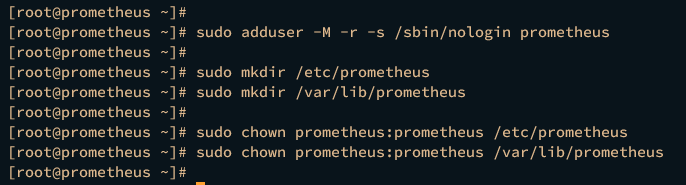
下载 Prometheus 预编译包
现在,你将在你的服务器上安装 Prometheus。在本演示中,你将通过预编译的二进制包来安装 Prometheus。你将在 IP 地址为 192.168.10.20 的 AlmaLinux 服务器上安装 Prometheus。
运行以下 dnf 命令在你的系统上安装 wget。
sudo dnf install wget -y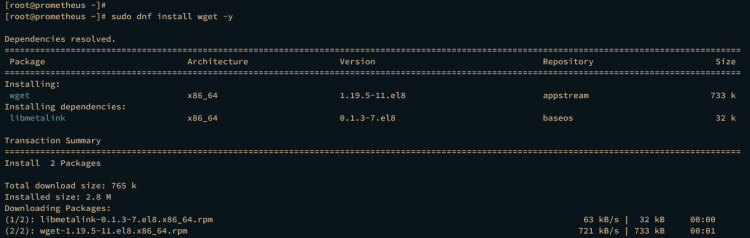
将工作目录切换到 /usr/src,并通过 wget 下载 Prometheus 的预编译二进制文件。
cd /usr/src
wget https://github.com/prometheus/prometheus/releases/download/v2.44.0/prometheus-2.44.0.linux-amd64.tar.gz
现在使用下面的 tar 命令解压 Prometheus 二进制文件 prometheus-2.44.0.linux-amd64.tar.gz。你应该会得到一个名为 prometheus-2.44.0.linux-amd64 的新目录,其中包含 Prometheus 二进制文件和部分默认配置。
tar -xf prometheus-2.44.0.linux-amd64.tar.gz运行以下命令,将默认的 Prometheus 配置文件 prometheus.yml 以及一些重要目录复制到 /etc/prometheus/。
sudo cp /usr/src/prometheus-*/prometheus.yml /etc/prometheus/
sudo cp -r /usr/src/prometheus-*/consoles /etc/prometheus
sudo cp -r /usr/src/prometheus-*/console_libraries /etc/prometheus
之后,使用以下命令将 /etc/prometheus/ 目录的所有权改为用户 prometheus 和组 prometheus。
sudo chown -R prometheus:prometheus /etc/prometheus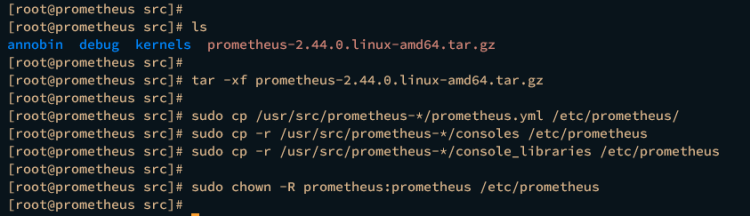
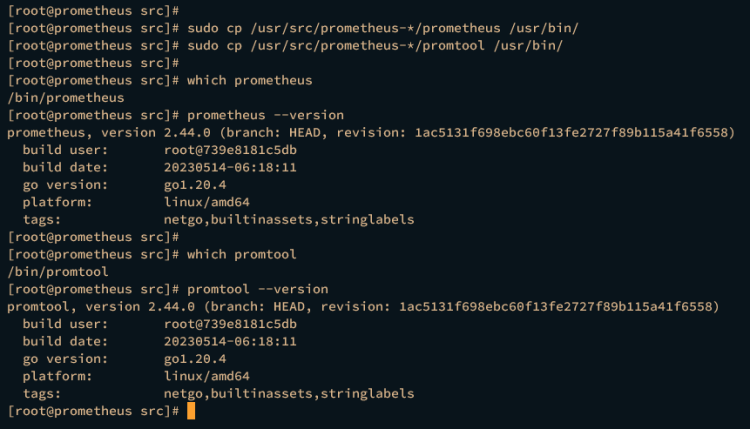
接下来,运行以下命令将 prometheus 和 promtool 的二进制文件复制到 /usr/bin/ 目录。
sudo cp /usr/src/prometheus-*/prometheus /usr/bin/
sudo cp /usr/src/prometheus-*/promtool /usr/bin/
然后,使用以下命令验证 prometheus 和 promtool。
which prometheus
prometheus --version
which promtool
promtool --version如果安装成功,你应该会看到 prometheus 和 promtool 命令的完整路径(位于 /usr/bin/ 目录中)。你还会看到已安装的 Prometheus 版本。
配置 Prometheus
在下载并安装 Prometheus 之后,你将要开始 Prometheus 的基础配置。
使用 nano 编辑器打开 Prometheus 配置文件 /etc/prometheus/prometheus.yml。
nano /etc/prometheus/prometheus.yml在 scrape_configs 参数处,添加一个新的名为 prometheus 的 job(任务),其目标为 Prometheus 服务器自身。在本示例中,Prometheus 服务器的 IP 地址为 192.168.10.20,这将用于抓取 Prometheus 自身的 metrics(指标)。
# A scrape configuration containing exactly one endpoint to scrape:
# Here it's Prometheus itself.
scrape_configs:
  # The job name is added as a label `job=<job_name>` to any timeseries scraped from this config.
  - job_name: "prometheus"
    # metrics_path defaults to '/metrics'
    # scheme defaults to 'http'.
    static_configs:
      - targets: ["192.168.10.20:9090"]
完成后保存并关闭文件。
接下来,使用 nano 编辑器命令为 prometheus 创建一个新的 systemd 服务文件 /etc/systemd/system/prometheus.service。
sudo nano /etc/systemd/system/prometheus.service添加以下配置,以 systemd 服务的方式运行 Prometheus。
[Unit]
Description=Prometheus
Wants=network-online.target
After=network-online.target
[Service]
User=prometheus
Group=prometheus
Type=simple
ExecStart=/usr/bin/prometheus \
    --config.file /etc/prometheus/prometheus.yml \
    --storage.tsdb.path /var/lib/prometheus/ \
    --web.console.templates=/etc/prometheus/consoles \
    --web.console.libraries=/etc/prometheus/console_libraries
[Install]
WantedBy=multi-user.target
完成后保存文件并退出编辑器。
现在运行以下命令重新加载 systemd 管理器,使 systemd 的更改生效。
sudo systemctl daemon-reload然后,使用下面的 systemctl 命令启动并设置 Prometheus 服务开机自启。
sudo systemctl start prometheus
sudo systemctl enable prometheus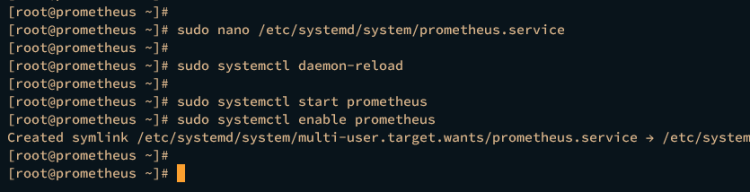
验证 prometheus 服务,确保其正在运行。
sudo systemctl status prometheus如果安装成功,你应该会看到 prometheus 服务的状态为 active (running)(运行中)。

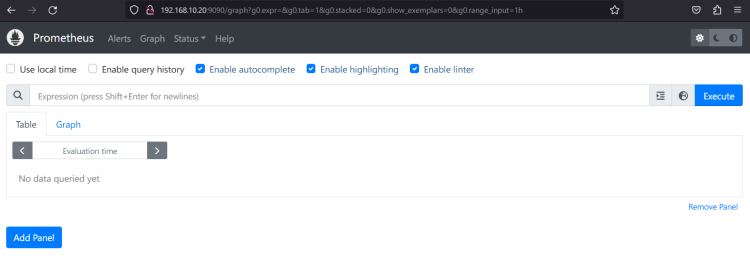
最后,打开你的网页浏览器,访问服务器 IP 地址加 9090 端口(即 http://192.168.10.20:9090/)。如果安装成功,你应该会看到如下的 Prometheus 图形页面:
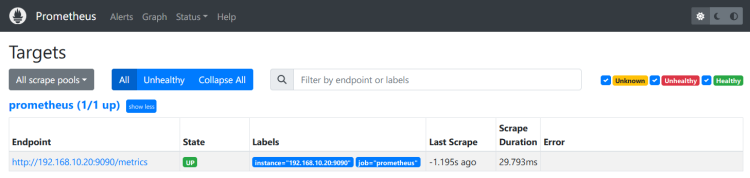
你也可以点击 Status > Targets 来验证监控端点的状态。你应该会看到名为 prometheus 的 job_name,其状态为 UP。
在目标监控主机上安装并配置 Node Exporter
Node Exporter 是 Prometheus 提供的一款应用,用于暴露目标监控主机的系统 metrics(指标)。它允许你抓取多种系统指标,并可暴露给 Prometheus 进行后续处理。
在本节中,你将在 IP 地址为 192.168.10.21 的 AlmaLinux 9 服务器上安装 Node Exporter。你将通过 Prometheus 提供的预编译二进制包来安装 Node Exporter。
下载并安装 Node Exporter
要安装 Node Exporter,你必须为它创建一个专用的系统用户,并将 Node Exporter 的二进制包下载到你的系统中。
首先,运行以下命令创建一个新的系统用户 node_exporter。
sudo adduser -M -r -s /sbin/nologin node_exporter使用下面的 dnf 命令安装 wget。
sudo dnf install wget -y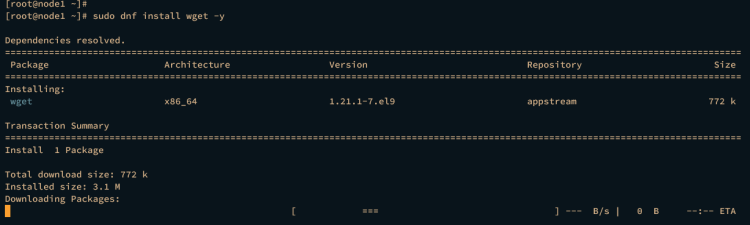
然后,切换到 /usr/src 目录并通过 wget 下载 Node Exporter 的预编译二进制文件。
cd /usr/src/
wget https://github.com/prometheus/node_exporter/releases/download/v1.6.0/node_exporter-1.6.0.linux-amd64.tar.gz
下载完成后,你应该会看到文件 node_exporter-1.6.0.linux-amd64.tar.gz。使用下面的 tar 命令将其解压。
tar -xf node_exporter-1.6.0.linux-amd64.tar.gz接下来,使用以下命令将 Node Exporter 的二进制文件移动到 /usr/bin 目录。
mv node_exporter-*/node_exporter /usr/bin现在使用以下命令验证 Node Exporter。如果成功,你应该会看到完整的二进制文件路径以及 Node Exporter 的版本。
which node_exporter
node_exporter --version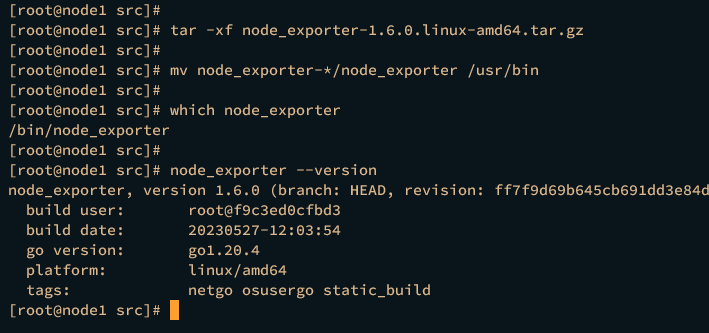
以服务方式在后台运行 Node Exporter
在 Node Exporter 安装完成后,你将把它配置为以 systemd 服务的方式在后台运行。
为此,使用下面的 nano 编辑器命令创建一个新的 systemd 服务文件 /etc/systemd/system/node_exporter.service。在本示例中,你将把 Node Exporter 作为 systemd 服务运行。
sudo nano /etc/systemd/system/node_exporter.service将以下配置写入该文件。
[Unit]
Description=Node Exporter
After=network.target
[Service]
User=node_exporter
Group=node_exporter
Type=simple
ExecStart=/usr/bin/node_exporter
[Install]
WantedBy=multi-user.target
完成后保存并退出文件。
现在运行下面的 systemctl 命令重新加载 systemd 管理器。
sudo systemctl daemon-reload然后使用以下命令启动并设置 node_exporter 服务开机自启。
sudo systemctl start node_exporter
sudo systemctl enable node_exporter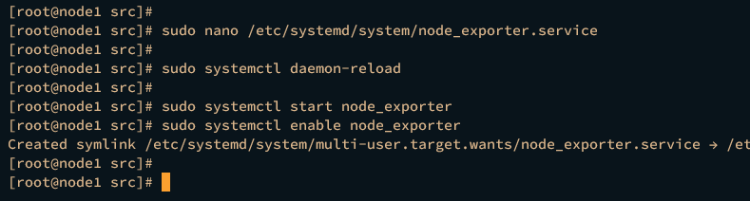
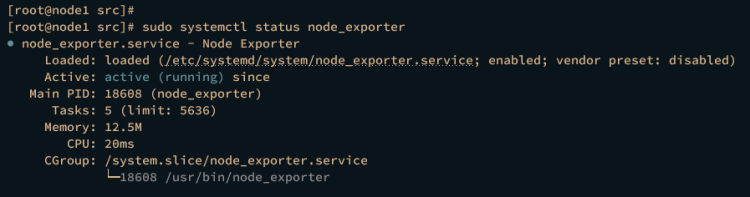
在 node_exporter 启动并设置开机自启后,运行以下命令进行验证,确保服务正在运行。
sudo systemctl status node_exporter如果正在运行,你应该会看到 node_exporter 服务的状态为 active (running)(运行中)。
最后,运行以下命令验证 Node Exporter 的端口。默认情况下,它运行在 9100 端口。
ss -tulpn | grep node你应该会看到 9100 端口正被 node_exporter 服务占用。

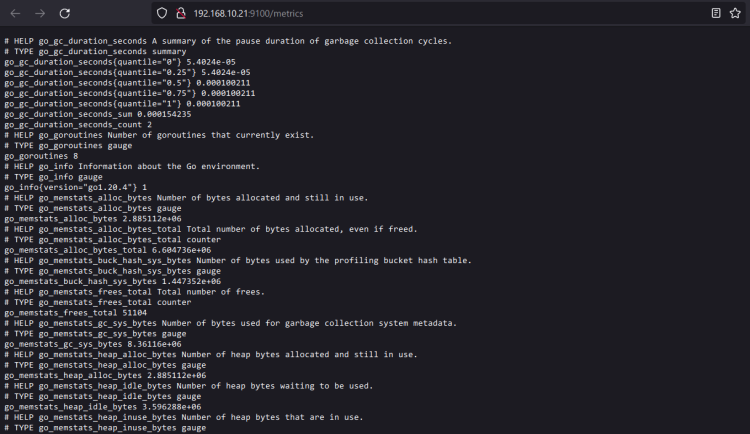
你也可以通过网页浏览器访问服务器 IP 地址加 9100 端口(即:http://192.168.10.21:9100/)来进行验证。你应该会看到通过 Node Exporter 监控的服务器端点数据。
将 Node Exporter 添加到 Prometheus 服务器
在本节中,你将把 Node Exporter 添加到 Prometheus 服务器。你已经在 192.168.10.21 服务器上安装并暴露了系统 metrics(指标),现在将其添加到运行在 192.168.10.20 上的 Prometheus 服务器。
使用以下 nano 编辑器打开 Prometheus 配置文件 /etc/prometheus/prometheus.yml。
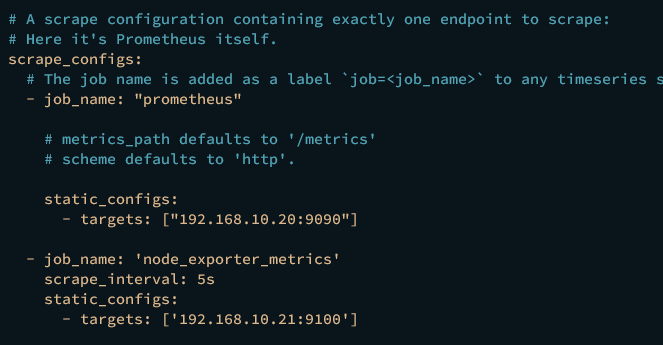
sudo nano /etc/prometheus/prometheus.yml在 scrape_config 参数内,添加一个新的 job_name 为 node_exporter_metrics,并填入 Node Exporter 的详细端点。下面的示例将监控 IP 地址为 192.168.10.21 的服务器 node1。
  - job_name: 'node_exporter_metrics'
    scrape_interval: 5s
    static_configs:
      - targets: ['192.168.10.21:9100']
完成后保存文件并退出编辑器。
现在运行以下命令重启 prometheus 服务以使更改生效。
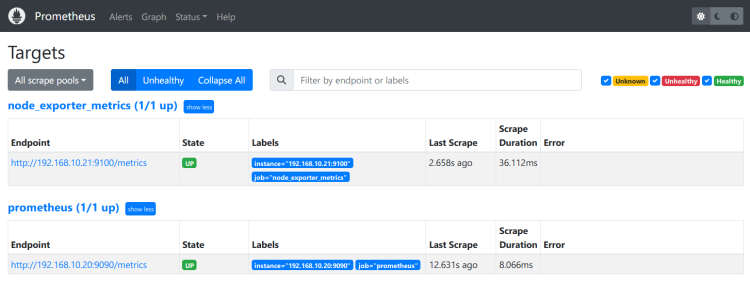
sudo systemctl restart prometheus现在通过网页浏览器打开 Prometheus,并点击 Status > Targets,确认 Node Exporter 已被添加。如果成功,你应该会看到名为 node_exporter_metrics 的 job,其状态为 UP。
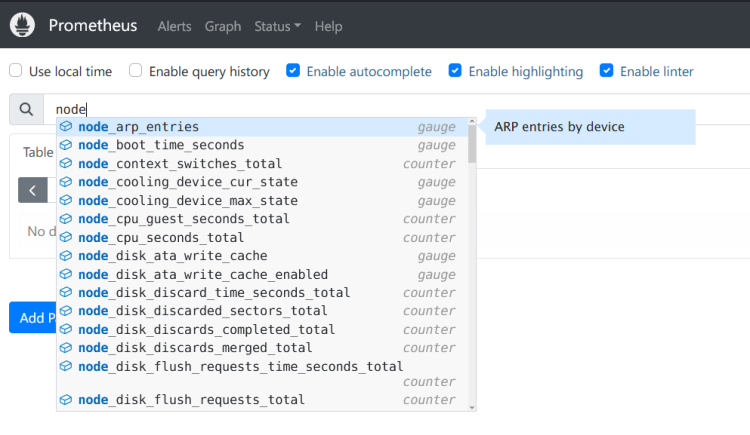
接下来,进入 Graph(图形)菜单,输入以 node_ 开头的查询,即可获取 Node Exporter 提供的查询列表。
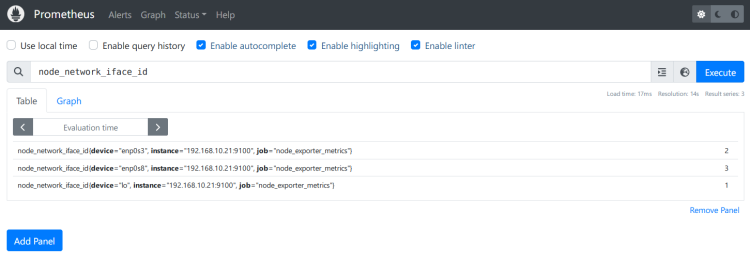
输入查询 node_network_iface_id,即可获取服务器 192.168.10.21 上的网络设备列表。
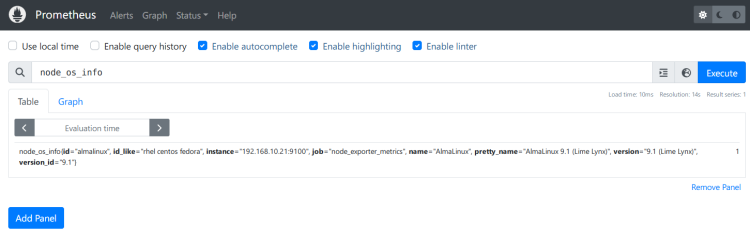
你也可以通过 node_os_info 查询来验证操作系统信息的详细信息。
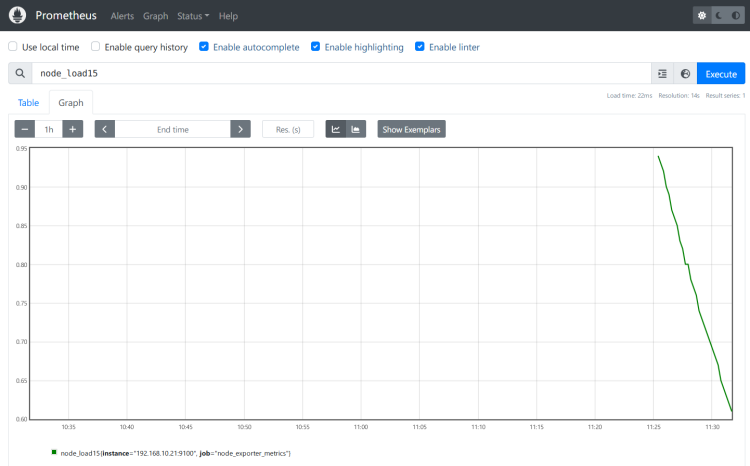
最后,输入查询 node_load15 并点击 Graph(图形)标签页,即可获取过去 15 分钟的系统负载状态。
结语
做得漂亮!你已成功在 AlmaLinux 9 服务器上安装了 Prometheus,并通过 Node Exporter 监控了一台 AlmaLinux 服务器。
现在你可以通过 Prometheus exporter 监控另一台服务器或监控你的应用程序。你也可以将 Prometheus 与 Grafana 集成,以实现监控系统数据的可视化。