
本页内容
- 先决条件与注意事项
- 在 ISPConfig 中创建远程用户
- 下载并解压迁移工具
- 准备免密登录(可选)
- 运行迁移(dry-run 试运行)
- 运行迁移
- 收尾步骤
- 重新同步你的目标服务器 重新同步账户与设置 重新同步数据
- 高级选项
- 重新同步账户与设置
- 重新同步数据
在本教程中,我们将演示如何使用 ISPConfig 迁移工具 2.0 将单台服务器迁移到一台全新的 ISPConfig 3.x 服务器。该迁移工具是 ISPConfig 迁移工具包(Migration Toolkit)的一部分,可在此处获取。
ISPConfig 迁移工具可用于将以下虚拟主机控制面板迁移到 ISPConfig 3.x 服务器:
- ISPConfig 2
- ISPConfig 3 至 3.3
- Plesk 10 - 12.5
- Plesk Onyx
- Confixx
- Cpanel
在本教程中,我们将把一台 ISPConfig 3.x 服务器迁移到运行 ISPConfig 3.2 或 3.3 的全新系统。从其他受支持的虚拟主机控制面板迁移操作类似。迁移工具将一步步引导你完成整个迁移过程。
先决条件与注意事项
- 源服务器上已安装 ISPConfig 3.x。
- 目标服务器上已安装 ISPConfig 3.1.7 或更高版本。
- 源服务器上已安装支持 JSON、mcrypt、OpenSSL 及 mbstring 的 PHP 5.3 及以上版本。
- 旧服务器与新服务器不能连接到同一台主服务器(master)。如果它们连接到同一台主服务器,请改用 ISPCopy(它同样属于迁移工具包的一部分)。
- 迁移工具包(Migration Toolkit)授权许可。
- Let's Encrypt 证书:旧服务器与新服务器必须使用相同的 Let's Encrypt 客户端。如果你的旧服务器使用的是 Certbot,请确保新系统也使用 Certbot,而不是 Acme.sh。如果你使用 ISPConfig 自动安装程序(auto-installer)安装新服务器,且旧服务器使用的是 certbot,则应在自动安装程序中使用命令行开关 --use-certbot,以便在新服务器上安装 certbot 而非 acme.sh。
- 多服务器架构(Multiserver):迁移工具支持迁移 ISPConfig 多服务器架构。此类迁移的目标可以是另一套多服务器架构,你也可以将多服务器架构合并到一套新的单服务器架构中。迁移工具必须依次在每套多服务器架构的各个(旧)节点上分别运行。目标 ISPConfig 系统可以是新多服务器架构的主节点(此时迁移工具会弹出一个对话框,供你选择数据应迁移到多服务器架构中的哪个新节点),也可以是新的单服务器。
在 ISPConfig 中创建远程用户
你需要在目标 ISPConfig 服务器上创建一个远程用户。
进入 System(系统)-> Remote User(远程用户)
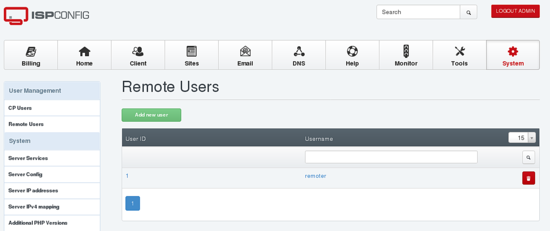
点击“Add new user(添加新用户)”按钮。
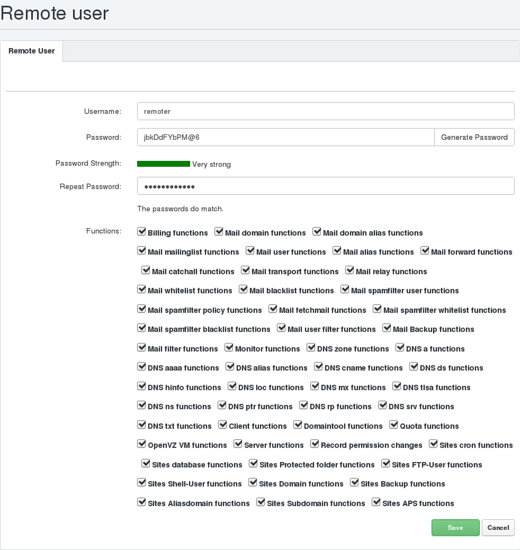
为远程用户输入用户名和密码,例如“remoter”,并确保勾选所有复选框。然后点击“save(保存)”。
如果你在目标服务器上使用的是 ISPConfig 3.1.11 版本,请以 root 用户身份编辑文件 /usr/local/ispconfig/security/security_settings.ini:
nano /usr/local/ispconfig/security/security_settings.ini
并将 ids_anon_enabled 和 ids_user_enabled 的值由 'yes' 改为 'no'。
....
[ids]
ids_anon_enabled=
no
ids_anon_log_level=1
ids_anon_warn_level=5
ids_anon_block_level=20
ids_user_enabled=
no
ids_user_log_level=1
ids_user_warn_level=10
ids_user_block_level=25
ids_admin_enabled=no
ids_admin_log_level=1
ids_admin_warn_level=5
ids_admin_block_level=100
sql_scan_enabled=yes
sql_scan_action=warn
apache_directives_scan_enabled=yes
nginx_directives_scan_enabled=yes
....
迁移完成后可以重新启用 IDS。如果你使用的是 ISPConfig 3.1.12 或更新版本,则无需进行此修改。
接下来,请检查目标服务器是否已安装 php-soap 模块。如果尚未安装,请现在安装。在 Debian 和 Ubuntu 上,你可以使用 apt 安装 PHP Soap 模块:
apt-get install php-soap另一个先决条件是目标服务器和源服务器都必须已安装 rsync。请使用类似以下命令进行检查:
rsync --version以确认两个节点都已安装 rsync。如果未安装,请安装操作系统对应的 rsync 软件包。例如使用:
apt-get install rsync在 Debian 和 Ubuntu 上,或者使用:
yum install rsync在 CentOS 上。
在目标服务器上,ISPConfig 自动安装程序可能创建了文件 /etc/ssh/sshd_config.d/custom.conf,该文件会导致迁移工具无法正常工作。如果该文件存在,必须将其删除。请以 root 用户身份在目标服务器上运行以下命令删除该文件:
rm /etc/ssh/sshd_config.d/custom.conf除非另有说明,后续所有步骤均在源服务器上执行。
下载并解压迁移工具
cd /root
mkdir migration
cd migration
wget https://www.ispconfig.org/downloads/ispconfig_migration_toolkit-latest.zip
unzip
ispconfig_migration_toolkit-latest.zip
mv ispconfig_migration_toolkit/ispc3-migration-tool-*.tar.gz /root/migration/
migtool.tar.gz
tar xzf migtool.tar.gz
rm -f migtool.tar.gz
准备免密登录(可选)
在迁移过程中,会建立 SSH 连接,用于将设置和数据从源服务器传输到目标服务器。为此,源服务器必须能够免密码连接到目标服务器。
你可以选择以下任一方式:
- 自行配置免密登录(将源服务器的公钥添加到目标服务器 root 用户的 authorized_keys 文件中)。
- 或者临时允许通过密码以 root 身份通过 SSH 访问目标服务器。随后迁移工具会为你调用 ssh-keygen 和 ssh-copy-id。这些均为直接的系统调用,因此如果在此步骤中系统提示你输入目标的 ssh root 密码,该输入并非由迁移工具读取,而是 ssh-copy-id 系统命令直接发起的提示。
运行迁移(dry-run 试运行)
./migrate如果你希望使用特定的 PHP 版本运行该工具(例如 Ubuntu 22.04 上的 PHP 7.4),请改用以下命令:
PHP=/usr/bin/php7.4 ./migrate上述任意命令的运行结果类似如下:
Welcome to the ISPConfig3 Migration Tool V2 Version 2.0.0

Although this tool does not alter anything on the source server, you should
ALWAYS make a BACKUP of all your data before migrating to a new server!

You need to have some prerequisites set up to use this tool:
 * create an remote user (system -> remote users) in your TARGET ISPConfig3 system and grant ALL rights to it
 * make sure this (the SOURCE system) can reach the remoting api of the TARGET system

*** Disclaimer of Warranties ***
ISPConfig disclaims to the fullest extent authorized by law any and all other warranties, whether express or implied,
including, without limitation, any implied warranties of title, non-infringement, integration, merchantability or
fitness for a particular purpose.
By continuing to use this software, you agree to this.

First of all the most important question:
Do you want to make a real migration or a dry run? (dry, migrate):
dry
我们希望先以 dry-run(试运行)模式运行,因此在此处输入 dry。
The following modules are available:
        1. Confixx to ISPConfig 3 migrator (confixx)
        2. Plesk (10.5 - 17.5) to ISPConfig 3 migrator (plesk)
        3. ISPConfig 2 to 3 migrator (ispconfig2)
        4. ISPConfig 3 to ISPConfig 3 migrator (ispconfig3)

Which one is the one matching your SOURCE system? (confixx, plesk, ispconfig2, ispconfig3):
ispconfig3
迁移工具需要知道你在源服务器上使用的是哪种控制面板。它会尝试自动识别源服务器上所需的模块,因此通常你只需直接按回车(ENTER)即可。
Enter this (SOURCE) server's ip that is used for outgoing connections [192.168.10.10]:
123.123.123.123
迁移工具需要知道源服务器用于对外连接的 IP 地址,即源服务器连接其他服务器时对方看到的 IP 地址。工具会尝试自动猜测该 IP 地址,但如果例如你使用的是私有网络,可能需要手动修改该值。
Name of the remote user of TARGET ISPConfig3 system []:
remoter

Password for this remote user []:
yourremotepassword

URL to the remote system (e. g. https://yourdomain.com:8080/remote/) []:
https://www.example.com:8080/remote/

You gave me remote user 'remoter' with password 'yourremotepassword'
And I shall connect to 'https://www.example.com:8080/remote/'
Is this correct? (y, n):
y
向迁移工具提供你之前在目标服务器上创建的远程用户的信息,并输入“y”确认。随后迁移工具将尝试连接目标系统的远程 API。
I will now have to make some changes in your ISPConfig3 TARGET system config.
        1.) Enable domain module if needed
        2.) Remove client prefixes (will be undone automatically at the end)
        3.) Enable login for mail accounts if needed

Testing MySQL connection ... OK

What is the main public(!) ip of the target server www.example.com? [123.123.123.123]:
[ENTER]
迁移工具会修改目标服务器上的一些 ISPConfig 设置(在 dry-run 试运行模式下不会执行这些修改),并测试与 MySQL 服务器的连接。它会通过查看部分系统文件来猜测 MySQL 凭据,但最终仍会提示你输入 MySQL root 密码。
接下来,你需要提供目标服务器的公网 IP。该 IP 会预先从 DNS 获取,但你可能需要进行调整,尤其是在源服务器和目标服务器使用相同主机名的情况下。
Do you want me to overwrite/update existing entries with the same name? (y, n):
y

You can now set entry names, that shall NOT be overwritten.
You should use this if you plan to import several server's data to a multi-server installation.
If this tool finds a name that is already present, it UPDATES the data with the SOURCE data!
If this tool finds a name that you marked as not to overwrite, it either
         - appends a _2, _3 etc. to this name and creates a new entry, or
         - prepends a server prefix if specified by --server-prefix argument
迁移工具支持将多台服务器合并到同一个目标。在合并时,源服务器上可能会出现用户名冲突的情况,例如你有两个名为“testdatabase”的数据库。如果你对该问题回答“y”,那么第二个数据库将替换第一个。如果你回答“n”,则第二个数据库的名称会被改为“testdatabase_2”。
在进行单服务器迁移时务必回答“y”,否则如果你在同一源服务器上多次运行迁移工具,将会产生重复数据。
You currently have 0 FTP username name(s) marked:

You can now add further names to this list. Just enter them one by one or provide a comma-separated list.
To delete one or more names from the list, prepend a /DELETE to your input.
To clear all names from the list, type /CLEAR.
A blank input proceeds to the next step.
Your choice :
[ENTER]
迁移工具允许你将部分 FTP、数据库、客户(clients)等用户名标记为“reserved(保留)”。这意味着它们不会被覆盖,正如上一节所述。通常你可以留空不填,但在某些情况下,你可能希望阻止“admin”或“administrator”等用户名被导入。此时你可以在此处输入它们,导入的名称将被重命名为“admin_2”等。
该问题会针对不同的服务类型重复询问(FTP、数据库、客户、邮件用户)。
What is the database name of your SOURCE ISPConfig 3 installation? [dbispconfig]:
[ENTER]
工具现在会询问源服务器上存储控制面板数据的数据库名称。请检查识别出的数据库是否正确,如有需要请进行修改。
Do you want to migrate only some services or everything?
Valid services are: client, web, mail, ftp, database, cronjob, dns, billing
Please enter one or more services (comma-separated) or leave blank for all:
[ENTER]
新版迁移工具支持仅迁移部分服务,例如只迁移邮件账户而跳过网站(webs)等。
由于我们希望迁移所有服务,因此直接留空并按回车(ENTER)即可。
To copy over web data, I need SSH access to the target webserver.
Please make sure that root login via SSH is allowed. On the target open /etc/ssh/sshd_config
and set PermitRootLogin to yes or without-password.
You can revert this once the migration is complete.

What is the ip for the target web server to connect via SSH? [123.123.123.123]:
[ENTER]

What is the SSH port? [22]:
[ENTER]
为了复制网站(web)、邮件(mail)和数据库(db)数据,迁移工具需要能够免密码通过 SSH 访问目标服务器。你需要提供源服务器应连接的 IP 和端口。如果你尚未配置免密访问,系统会提示你输入目标服务器的 root SSH 密码。
Testing MySQL connection ... OK

Starting API calls.

[50/74] <Domain> processing mydomain.com
工具现在将开始在目标 ISPConfig 上创建/更新所有条目。当然,在 dry-run 试运行模式下它不会修改或复制任何内容。请等待 API 调用完成。
Processing of entries done.
=============
Migration tool run completed.
一旦迁移工具顺利完成 dry-run 试运行且未出现错误,我们就可以继续进行真正的迁移。
运行迁移
./migrate如果你希望使用特定的 PHP 版本运行该工具(例如 Ubuntu 22.04 上的 PHP 7.4),请改用以下命令:
PHP=/usr/bin/php7.4 ./migrate上述任意命令的运行结果类似如下:
	Welcome to the ISPConfig3 Migration Tool V2 Version 2.0.0rc2

Although this tool does not alter anything on the source server, you should
ALWAYS make a BACKUP of all your data before migrating to a new server!

You need to have some prerequisites set up to use this tool:
 * create an remote user (system -> remote users) in your TARGET ISPConfig3 system and grant ALL rights to it
 * make sure this (the SOURCE system) can reach the remoting api of the TARGET system

*** Disclaimer of Warranties ***
ISPConfig disclaims to the fullest extent authorized by law any and all other warranties, whether express or implied,
including, without limitation, any implied warranties of title, non-infringement, integration, merchantability or
fitness for a particular purpose.
By continuing to use this software, you agree to this.

First of all the most important question:
Do you want to make a real migration or a dry run? (dry, migrate):
migrate
这次我们对提示输入“migrate(迁移)”,并像 dry-run 试运行期间一样回答相关问题。工具会预填你在试运行时的输入,因此你多半只需直接按回车(ENTER)。
Testing MySQL connection ... OK
Copying Let'sEncrypt files to target ... OK

Starting API calls.
[9/11]
 processing
[email protected]
 (web213p41)
这次过程会稍长一些,因为实际执行了真正的 API 调用。请等待过程完成。
Processing of entries done.
Target ISPConfig job queue has 35 entries left. Waiting ..
为了确保目标服务器上创建所有路径,迁移工具会等待 ISPConfig 处理完所有请求后再继续。
[INFO] Target ISPConfig job queue has completed. Continuing.

[19/935] Syncing /var/www/clients/client26/web21/web to /var/www/clients/client1424/web21/
现在工具会同步所有路径(网站、邮件),并将数据库内容复制到目标服务器。根据你的数据量大小,此过程可能需要一段时间。
如果你希望将实际的数据同步放到单独的步骤中进行,可以运行 ./migrate --no-syncjobs 来代替 ./migrate,从而跳过同步步骤。
收尾步骤
迁移工具会重置它在开始时修改过的值(例如客户前缀)。
根据你源控制面板的不同,迁移工具会在目标 ISPConfig 上启用域名(domain)模块。这意味着域名只有在先由管理员分配后(通过 Client(客户)-> Domains(域名)),才能用于网站、邮件域名等。如果你不想使用域名模块,可以在 System(系统)-> Interface settings(界面设置)-> “Domains(域名)”标签页下将其禁用。
最后,请检查生成的 migrate.log,查看其中是否包含带有 [ERROR] 或 [WARNING] 标记的记录。这些标记表示迁移过程中出现了问题。
重新同步你的目标服务器
重新同步账户与设置
如果在迁移之后源控制面板上的内容发生了变化,你可以直接重新运行迁移。迁移工具会使用源服务器上的新设置更新所有条目,并添加在此期间新建的条目。但请注意,源服务器上被删除的条目不会在目标服务器上被删除!
重新同步数据
如果你只想重新同步网站、邮件和数据库的数据,可以运行 ./migrate --syncjobs。这将跳过所有迁移步骤,仅执行网站、数据库和邮件的同步。
你也可以仅重新同步其中一项服务,例如 ./migrate --syncjobs --only=database。这将跳过网站数据和邮件的重新同步。
高级选项
要获取高级选项的列表(例如可迁移单个网站、邮件域名或客户),请使用 --help 选项。
./migrate --help当前的可选项包括:
Usage:  migrate <options>
        List of options:
        --help
                        Show this screen
        --server-prefix=<prefix>
                Use given prefix for conflicting usernames, if further
conflicts occur,
                add _2 _3 _4 ... to username
        --source-temp-dir=<parth>
                Set a different temp directory for actions on the source
server than /tmp
        --target-temp-dir=<parth>
                Set a different temp directory for actions on the target
server than /tmp
        --syncjobs
                Don't run the migration process, just re-sync all data
(web files, database contents)
        --no-syncjobs
                Only do the migration, don't copy any data files or
database contents to target
        --ignore-sync-errors
                Don't abort syncjobs processing if an error occurs. This
can be helpful for example
                if a command like chattr does not work correctly on the
target server.
        --confixx-no-domain
                On a confixx migration (source server) do not create a
dummy website that contains
                all other domains of that client as alias domains.
                Confixx uses a different approach for storing and
managing domains, so there is no
                "main" domain, but a hosting instead, that has all
domains assigned.
                On confixx servers where clients only have a single
domain it can be better to not
                create a dummy website with a single alias, but use the
domain as website instead.
        --only=client|web|mail|ftp|database|cronjob|dns|billing
                Only migrate the given service(s) and skip the others.
Can be provided multiple times.
        --exclude=client|web|mail|ftp|database|cronjob|dns|billing
                Migrate all services but the given one(s). Can be
provided multiple times.
        --only=/--exclude= on --syncjobs run
                When limiting the resync to single services, only web,
mail, database, system are valid.
        --only-client=<username>
                Only migrate a single client and it's data (web, mail
etc.). This can be used together
                with --only= / --exclude= to limit the migrated data
even further.
        --only-web=<domain.com>
                Only migrate the given domain and it's assigned
databases, ftp accounts etc.
                This can be used together with the other
--only-x/--exclude-x and --only=/--exclude= options
                to specify the data to be migrated.
        --only-mail=<domain.com>
                Only migrate the given mail domain and it's assigned
mail accounts, spam filter etc.
                This can be used together with the other
--only-x/--exclude-x and --only=/--exclude= options
                to specify the data to be migrated.
        --only-database=<databasename>
                Only migrate the given database and it's parent website.
                This can be used together with the other
--only-x/--exclude-x and --only=/--exclude= options
                to specify the data to be migrated.
        --only-dns=<domain.com>
                Only migrate the given DNS zone and it's assigned DNS
records.

                The above options can also be used in the opposite way,
using --exclude-client, --exclude-web,
                --exclude-mail, --exclude-database, --exclude-dns
                WARNING! Clients ALWAYS have to be migrated otherwise
you will have all migrated data assigned
                to the admin user instead of the client!