
本页内容
- 常见的 Linux Shell
- Linux chsh 命令
- 问题1:如何使用 chsh?
- 问题2:如何使用 chsh 更改登录 Shell?
- 问题3:如何为其他用户更改登录 Shell?
- 问题4:如何让 chsh 以非交互模式运行?
- 问题5:如何查看系统中可用的登录 Shell 列表?
- 总结
Linux 中的 chsh(change shell,更改 Shell)命令是一个实用工具,允许用户更改自己的默认登录 Shell。登录 Shell 是用户在登录类 Unix 系统后所交互的命令行界面。常见的 Shell 包括 dash、bash、zsh、ksh 和 fish。
在深入了解 chsh 命令之前,有必要先理解什么是登录 Shell。登录 Shell 是用户登录后以其用户 ID 运行的第一个进程,它负责初始化用户环境并提供与系统交互的接口。
常见的 Linux Shell
- Bash(Bourne Again Shell):许多 Linux 发行版的默认 Shell,以便捷易用和丰富功能著称。
- Zsh(Z Shell):bash 的扩展版本,提供更多附加功能,如改进的 Tab 补全与高度可定制性。
- Ksh(Korn Shell):兼具 sh 与 csh 脚本特性的 Shell。
- Fish(Friendly Interactive Shell):以语法高亮、自动建议等友好特性闻名。
- Dash:Linux Dash Shell(dash)是一款轻量、符合 POSIX 标准的 Shell,以速度快、资源占用少为设计目标,常被用作 Debian 系系统的默认脚本 Shell。
Linux chsh 命令
正如上文介绍,chsh 命令可用于更改你的登录 Shell。其语法如下:
chsh [options] [LOGIN]以下是该工具 man 手册页中关于它的说明:
       The chsh command changes the user login shell. This determines the name
       of the user's initial login command. A normal user may only change the
       login shell for her own account; the superuser may change the login
       shell for any account.
下面是一些以问答形式呈现的示例,能让你很好地理解 chsh 命令的工作方式。
问题1:如何使用 chsh?
基本用法非常简单——直接执行不带任何参数的 'chsh' 命令即可。系统会要求你输入登录密码,验证通过后,你就可以更改自己的登录 Shell 了。
chsh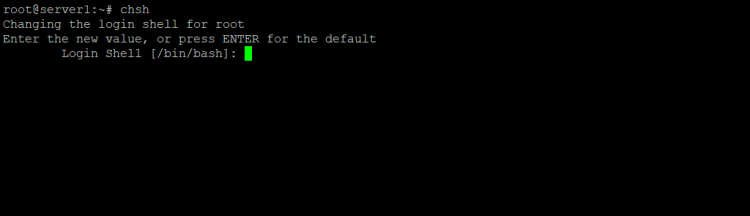
注意:默认更改的是当前用户的登录 Shell。
问题2:如何使用 chsh 更改登录 Shell?
正如你所预期的,只需输入新的取值(参见上一个示例中的截图),你的 Shell 就会被更改为新的那个。
例如,我输入了 /bin/sh 作为新取值。
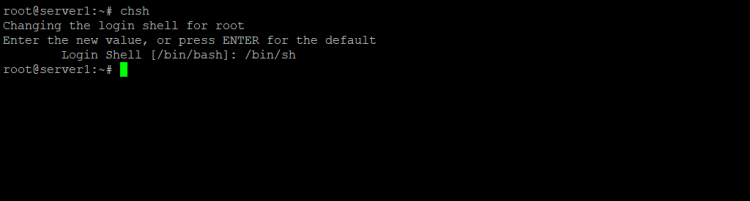
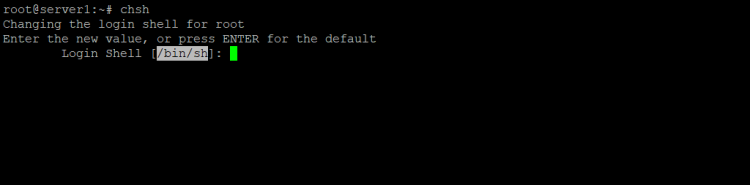
若要验证更改是否生效,可以再次运行 chsh 命令。方括号中显示的值就是当前的 Shell。在我的例子中,当前 Shell 变成了 /bin/sh:
问题3:如何为其他用户更改登录 Shell?
为此,只需将用户名作为 chsh 命令的输入参数即可。
chsh [username]例如,要更改 root 用户的登录 Shell,可按如下方式使用 chsh:
chsh root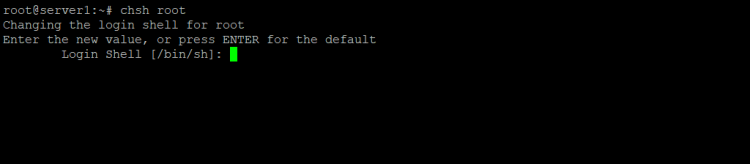
问题4:如何让 chsh 以非交互模式运行?
使用 -s 命令行选项即可,该选项要求传入一个 Shell 名称作为参数。
例如:
chsh -s /bin/sh这样,当前用户的登录 Shell 就会以非交互的方式被更改为 /bin/sh。
问题5:如何查看系统中可用的登录 Shell 列表?
想快速查看系统中可用的 Shell 列表,只需 cat 一下 /etc/shells 文件即可。
例如,以下是我的系统上产生的输出:
# /etc/shells: valid login shells
/bin/sh
/bin/bash
/bin/rbash
/bin/dash
注意:
       The only restriction placed on the login shell is that the command name
       must be listed in /etc/shells, unless the invoker is the superuser, and
       then any value may be added. An account with a restricted login shell
       may not change her login shell. For this reason, placing /bin/rsh in
       /etc/shells is discouraged since accidentally changing to a restricted
       shell would prevent the user from ever changing her login shell back to
       its original value.
总结
可以看到,chsh 命令是命令行用户应当掌握的一个重要工具。在本教程中,我们讨论了该工具所提供的绝大多数命令行选项。想进一步了解 chsh,请查阅其 man 手册页。