
本页目录
- 准备工作
- 安装 Nginx 和 PHP
- 在 Alma Linux 8 上安装 DokuWiki
- 为 DokuWiki 创建 Nginx 虚拟主机
- 访问 DokuWiki Web 管理界面
- 使用 Let's Encrypt 保护 DokuWiki
- 总结
DokuWiki 是一款开源的、基于 Web 的维基软件,主要为 Linux 系统设计。它通过简单直观的 Web 界面,允许用户创建和编辑内容,从而实现协作式文档编写与知识管理。DokuWiki 以轻量、易安装而著称,它不需要数据库,因此非常适合小型组织或项目使用。其强大的文本格式化能力、版本控制以及丰富的插件生态,使其成为在 Linux 环境下创建和维护文档、知识库和网站的通用工具。
本教程将向您展示如何在 Alma Linux 上使用 Nginx 安装 DokuWiki。
准备工作
- 一台运行 Alma Linux 8 的服务器。
- 一个已指向您服务器 IP 的有效域名。
- 服务器上已配置 root 密码。
安装 Nginx 和 PHP
默认情况下,Alma Linux 8 的默认仓库中不包含最新版本的 PHP。因此,您需要在系统上安装 EPEL 和 Remi 仓库。
您可以通过运行以下命令来安装两者:
dnf install epel-release -y
dnf install https://rpms.remirepo.net/enterprise/remi-release-8.rpm -y
两个软件包安装完成后,使用以下命令启用 PHP Remi 仓库:
dnf module enable php:remi-7.4 -y您应该会看到如下输出:
Dependencies resolved.
==============================================================================================================================================
 Package                           Architecture                     Version                           Repository                         Size
==============================================================================================================================================
Enabling module streams:
 php                                                                remi-7.4

Transaction Summary
==============================================================================================================================================

Complete!
接下来,使用以下命令安装 Nginx Web 服务器、PHP 以及其他所需扩展:
dnf install nginx php php-cli php-fpm php-gd php-xml php-zip -y所有软件包安装完成后,编辑 PHP-FPM 配置文件,并修改 listen、user 和 group 设置:
nano /etc/php-fpm.d/www.conf修改以下行:
user = nginx
group = nginx
保存并关闭文件,然后使用以下命令启动并设置 Nginx 和 PHP-FPM 服务开机自启:
systemctl start nginx php-fpm
systemctl enable nginx php-fpm
您也可以运行以下命令验证 PHP 版本:
php --version您将得到如下输出:
PHP 7.4.28 (cli) (built: Feb 15 2022 13:23:10) ( NTS )
Copyright (c) The PHP Group
Zend Engine v3.4.0, Copyright (c) Zend Technologies
    with Zend OPcache v7.4.28, Copyright (c), by Zend Technologies
在 Alma Linux 8 上安装 DokuWiki
接下来,您需要从其官方网站下载最新版本的 DokuWiki。您可以使用以下命令进行下载:
wget https://download.dokuwiki.org/src/dokuwiki/dokuwiki-stable.tgz下载完成后,在 Nginx 网站根目录中为 DokuWiki 创建一个目录:
mkdir /var/www/html/dokuwiki接下来,使用以下命令解压下载的文件:
tar xvf dokuwiki-stable.tgz接下来,将解压后的目录移动到 DokuWiki 目录:
mv dokuwiki-2020-07-29/* /var/www/html/dokuwiki/接下来,将 DokuWiki 目录的所有权更改为 Nginx:
chown -R nginx:nginx /var/www/html/dokuwiki完成后,您可以进入下一步。
为 DokuWiki 创建 Nginx 虚拟主机
接下来,使用以下命令为 DokuWiki 创建 Nginx 配置文件:
nano /etc/nginx/conf.d/dokuwiki.conf添加以下行:
server {
    listen 80;
    server_name wiki.example.com;
    root /var/www/html/dokuwiki;
    index index.html index.htm index.php doku.php;

    client_max_body_size 15M;
    client_body_buffer_size 128K;

    location / {
        try_files $uri $uri/ @dokuwiki;
    }

    location ^~ /conf/ { return 403; }
    location ^~ /data/ { return 403; }
    location ~ /\.ht { deny all; }

    location @dokuwiki {
        rewrite ^/_media/(.*) /lib/exe/fetch.php?media=$1 last;
        rewrite ^/_detail/(.*) /lib/exe/detail.php?media=$1 last;
        rewrite ^/_export/([^/]+)/(.*) /doku.php?do=export_$1&id=$2 last;
        rewrite ^/(.*) /doku.php?id=$1 last;
    }
    location ~ \.php$ {
        try_files $uri =404;
        fastcgi_pass unix:/run/php-fpm/www.sock;
        fastcgi_index index.php;
        include fastcgi_params;
        fastcgi_param SCRIPT_FILENAME $document_root$fastcgi_script_name;
    }
}
保存并关闭文件,然后使用以下命令检查 Nginx 是否存在语法错误:
nginx -t您将得到如下输出:
nginx: the configuration file /etc/nginx/nginx.conf syntax is ok
nginx: configuration file /etc/nginx/nginx.conf test is successful
最后,重启 Nginx 服务以使更改生效:
systemctl restart nginx您也可以运行以下命令查看 Nginx 的状态:
systemctl status nginx您将得到如下输出:
? nginx.service - The nginx HTTP and reverse proxy server
   Loaded: loaded (/usr/lib/systemd/system/nginx.service; disabled; vendor preset: disabled)
  Drop-In: /usr/lib/systemd/system/nginx.service.d
           ??php-fpm.conf
   Active: active (running) since Sat 2022-03-26 04:26:32 UTC; 4s ago
  Process: 5020 ExecStart=/usr/sbin/nginx (code=exited, status=0/SUCCESS)
  Process: 5018 ExecStartPre=/usr/sbin/nginx -t (code=exited, status=0/SUCCESS)
  Process: 5017 ExecStartPre=/usr/bin/rm -f /run/nginx.pid (code=exited, status=0/SUCCESS)
 Main PID: 5022 (nginx)
    Tasks: 2 (limit: 11412)
   Memory: 3.8M
   CGroup: /system.slice/nginx.service
           ??5022 nginx: master process /usr/sbin/nginx
           ??5023 nginx: worker process

Mar 26 04:26:32 linux systemd[1]: nginx.service: Succeeded.
Mar 26 04:26:32 linux systemd[1]: Stopped The nginx HTTP and reverse proxy server.
Mar 26 04:26:32 linux systemd[1]: Starting The nginx HTTP and reverse proxy server...
Mar 26 04:26:32 linux nginx[5018]: nginx: the configuration file /etc/nginx/nginx.conf syntax is ok
Mar 26 04:26:32 linux nginx[5018]: nginx: configuration file /etc/nginx/nginx.conf test is successful
Mar 26 04:26:32 linux systemd[1]: nginx.service: Failed to parse PID from file /run/nginx.pid: Invalid argument
Mar 26 04:26:32 linux systemd[1]: Started The nginx HTTP and reverse proxy server.
访问 DokuWiki Web 管理界面
现在,打开您的 Web 浏览器,使用 URL http://wiki.example.com/install.php 访问 DokuWiki 的 Web 安装向导。您将看到如下页面:
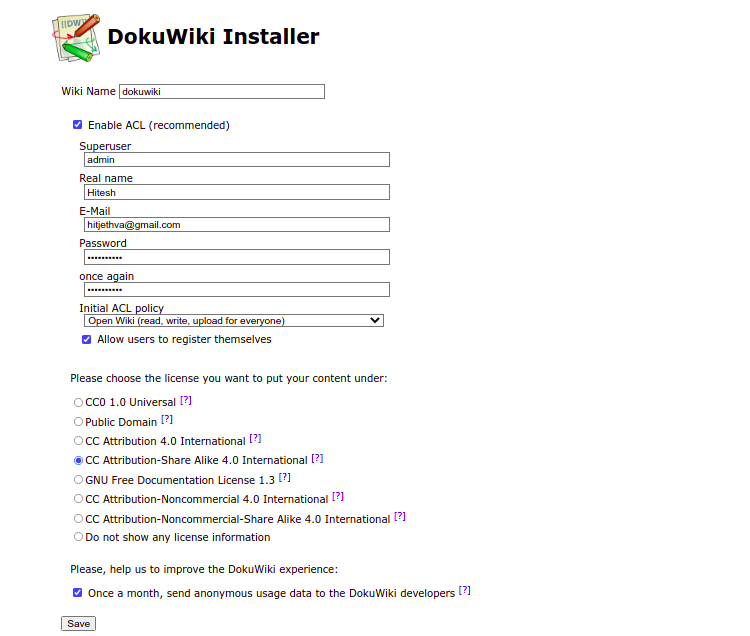
填写所有必填信息,如超级用户名、电子邮件、密码。然后,点击“保存”按钮。安装成功完成后,您应该会看到如下页面:
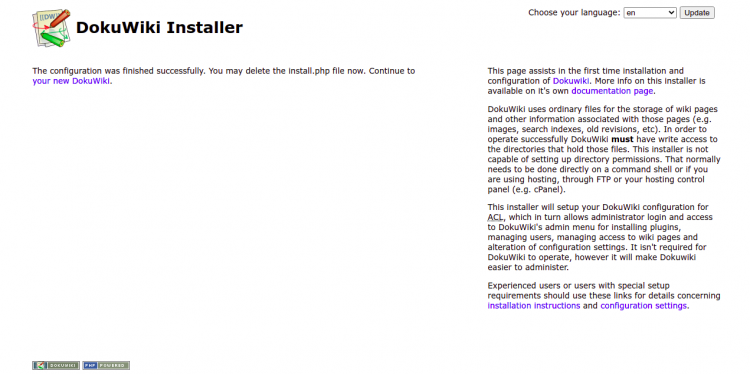
现在,点击您的新 DokuWiki。您应该会看到如下页面:
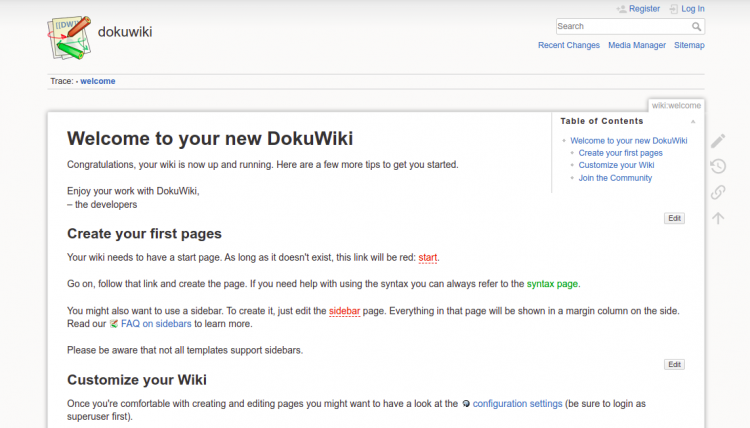
现在,点击登录按钮。您将被重定向到如下页面:
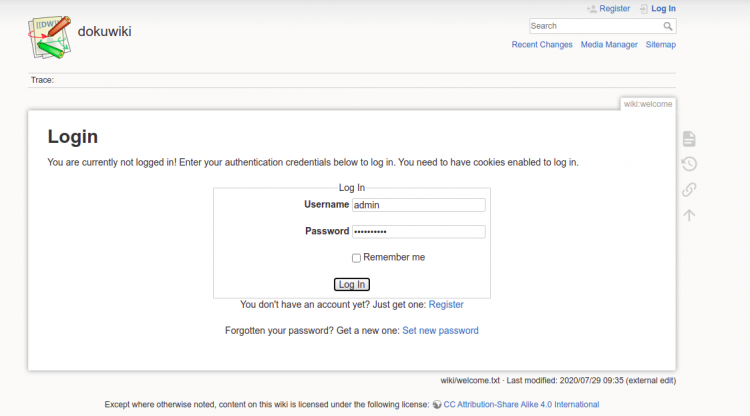
现在,输入您的管理员用户名和密码。然后,点击“登录”按钮。您应该在如下页面上看到 DokuWiki 仪表盘:
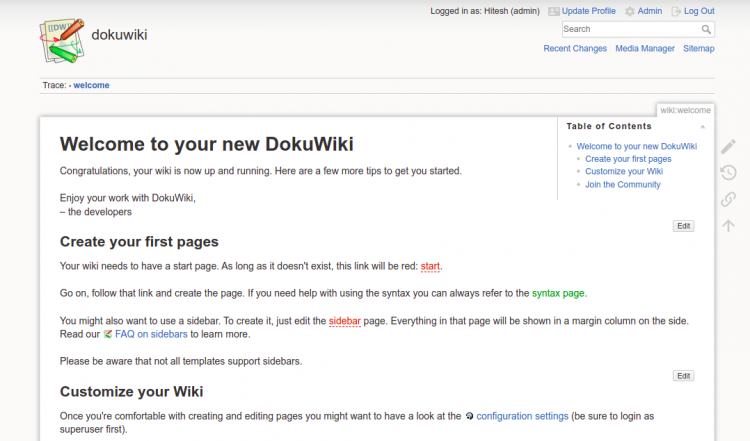
配置成功后,从 DokuWiki 根目录中删除 install.php 文件:
rm -rf /var/www/html/dokuwiki/install.php使用 Let's Encrypt 保护 DokuWiki
建议使用 Let's Encrypt 来保护维基网站。为此,您需要在服务器上安装 Certbot 软件包。您可以通过运行以下命令来安装它:
dnf install epel-release -y
dnf install certbot -y
接下来,运行以下命令在您的网站上安装 Let's Encrypt SSL:
certbot --nginx -d wiki.example.com系统会要求您提供电子邮件地址并接受服务条款:
Saving debug log to /var/log/letsencrypt/letsencrypt.log
Plugins selected: Authenticator apache, Installer apache
Enter email address (used for urgent renewal and security notices)
 (Enter 'c' to cancel):
[email protected]


- - - - - - - - - - - - - - - - - - - - - - - - - - - - - - - - - - - - - - - -
Please read the Terms of Service at
https://letsencrypt.org/documents/LE-SA-v1.2-November-15-2017.pdf. You must
agree in order to register with the ACME server. Do you agree?
- - - - - - - - - - - - - - - - - - - - - - - - - - - - - - - - - - - - - - - -
(Y)es/(N)o: Y

- - - - - - - - - - - - - - - - - - - - - - - - - - - - - - - - - - - - - - - -
Would you be willing, once your first certificate is successfully issued, to
share your email address with the Electronic Frontier Foundation, a founding
partner of the Let's Encrypt project and the non-profit organization that
develops Certbot? We'd like to send you email about our work encrypting the web,
EFF news, campaigns, and ways to support digital freedom.
- - - - - - - - - - - - - - - - - - - - - - - - - - - - - - - - - - - - - - - -
(Y)es/(N)o: Y
Account registered.
Requesting a certificate for wiki.example.com
Performing the following challenges:
http-01 challenge for wiki.example.com
Waiting for verification.
Cleaning up challenges
Deploying Certificate to VirtualHost /etc/nginx/conf.d/dokuwiki.conf
Redirecting all traffic on port 80 to ssl in /etc/nginx/conf.d/dokuwiki.conf

- - - - - - - - - - - - - - - - - - - - - - - - - - - - - - - - - - - - - - - -
Congratulations! You have successfully enabled https://wiki.example.com
- - - - - - - - - - - - - - - - - - - - - - - - - - - - - - - - - - - - - - - -
Subscribe to the EFF mailing list (email:
[email protected]
).


IMPORTANT NOTES:
 - Congratulations! Your certificate and chain have been saved at:
   /etc/letsencrypt/live/wiki.example.com/fullchain.pem
   Your key file has been saved at:
   /etc/letsencrypt/live/wiki.example.com/privkey.pem
   Your certificate will expire on 2022-04-09. To obtain a new or
   tweaked version of this certificate in the future, simply run
   certbot again with the "certonly" option. To non-interactively
   renew *all* of your certificates, run "certbot renew"
 - If you like Certbot, please consider supporting our work by:

   Donating to ISRG / Let's Encrypt:   https://letsencrypt.org/donate
   Donating to EFF:                    https://eff.org/donate-le
现在,您可以使用 URL https://wiki.example.com 安全地访问您的网站。
总结
恭喜!您已成功在 Alma Linux 8 服务器上安装并配置了 DokuWiki。现在您可以使用 DokuWiki 轻松创建自己的维基站点。如果您有任何问题,欢迎随时向我提问。