
在本页
- 先决条件
- 安装 PHP
- 在 Ubuntu 22.04 上安装 Symfony
- 创建 Symfony 项目
- 访问 Symfony
- 结论
Symfony 是用于 Web 应用程序的最受欢迎的 PHP 框架之一。它以独立的组件而著称,这些组件可以轻松集成到任何其他 PHP 项目中。Symfony 以开源软件的形式发布,适用于构建任何规模的 PHP 应用程序。
本教程将向您展示如何在 Ubuntu 22.04 上安装 Symfony PHP 框架。
先决条件
- 一台运行 Ubuntu 22.04 的服务器。
- 一个已指向您服务器 IP 的有效域名。
- 服务器上已配置 root 密码。
安装 PHP
Symfony 是一个 PHP 框架,因此必须在您的服务器上安装 PHP。如果尚未安装,您可以使用以下命令与其他依赖项一起安装它。
apt install php php-json php-ctype php-curl php-mbstring php-xml php-zip php-tokenizer php-tokenizer libpcre3 git zip unzip一旦 PHP 和其他 PHP 组件安装完成,您就可以进入下一步。
在 Ubuntu 22.04 上安装 Symfony
安装 Symfony 最简单、最容易的方式是通过自动安装脚本。
您可以使用以下命令下载并运行 Symfony 安装脚本。
wget https://get.symfony.com/cli/installer -O - | bashSymfony 安装完成后,您将看到以下输出。
2022-12-21 10:59:24 (11.6 MB/s) - written to stdout [6100/6100]

Symfony CLI installer

Environment check
  [*] cURL is installed
  [*] Tar is installed
  [*] Git is installed
  [*] Your architecture (amd64) is supported

Download
  Downloading https://github.com/symfony-cli/symfony-cli/releases/latest/download/symfony-cli_linux_amd64.tar.gz...
  % Total    % Received % Xferd  Average Speed   Time    Time     Time  Current
                                 Dload  Upload   Total   Spent    Left  Speed
  0     0    0     0    0     0      0      0 --:--:-- --:--:-- --:--:--     0
  0     0    0     0    0     0      0      0 --:--:-- --:--:-- --:--:--     0
100 5232k  100 5232k    0     0  2309k      0  0:00:02  0:00:02 --:--:-- 7400k
  Uncompress binary...
  Installing the binary into your home directory...
  The binary was saved to: /root/.symfony5/bin/symfony

The Symfony CLI was installed successfully!

Use it as a local file:
  /root/.symfony5/bin/symfony

Or add the following line to your shell configuration file:
  export PATH="$HOME/.symfony5/bin:$PATH"

Or install it globally on your system:
  mv /root/.symfony5/bin/symfony /usr/local/bin/symfony

Then start a new shell and run 'symfony'
接下来,您需要在系统上定义 Symfony 的系统路径。您可以使用以下命令完成:
export PATH="$HOME/.symfony5/bin:$PATH"
source ~/.bashrc
创建 Symfony 项目
至此,Symfony 已安装在您的服务器上。现在,您需要创建一个新 Symfony 项目来使用它。
symfony new project --full您将看到以下输出。
* Setting up the project under Git version control
  (running git init /root/project)


 [OK] Your project is now ready in /root/project
接下来,进入您的项目并使用以下命令运行 Web 服务器。
cd project
symfony server:start
您应该会看到以下输出。
 [OK] Web server listening
      The Web server is using PHP CLI 8.1.2
      http://127.0.0.1:8000


[Web Server ] Dec 21 11:01:36 |DEBUG  | PHP    Reloading PHP versions
[Web Server ] Dec 21 11:01:36 |DEBUG  | PHP    Using PHP version 8.1.2 (from default version in $PATH)
[Application] Dec 21 11:01:15 |INFO   | DEPREC User Deprecated: The "Monolog\Logger" class is considered final. It may change without further notice as of its next major version. You should not extend it from "Symfony\Bridge\Monolog\Logger".
[Web Server ] Dec 21 11:01:36 |INFO   | PHP    listening path="/usr/bin/php8.1" php="8.1.2" port=44005
[PHP        ] [Wed Dec 21 11:01:36 2022] PHP 8.1.2-1ubuntu2.9 Development Server (http://127.0.0.1:44005) started
访问 Symfony
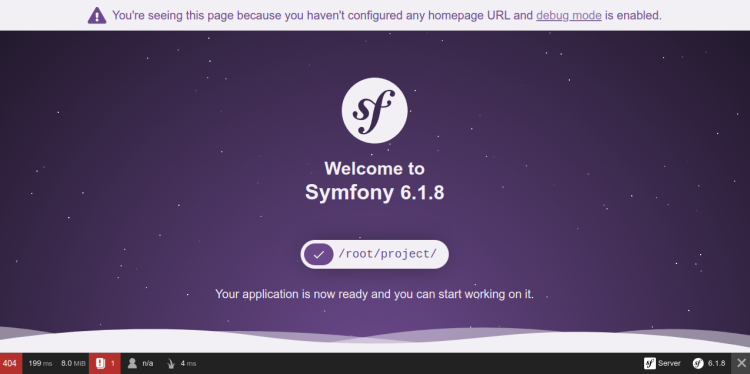
至此,Symfony 服务器已启动并监听 8000 端口。您现在可以使用 URL http://your-server-ip:8000 访问它。您应该在以下屏幕上看到 Symfony 默认页面。
结论
恭喜!您已成功在 Ubuntu 22.04 上安装了 Symfony PHP 框架。您现在可以开始使用 Symfony 框架构建基于 PHP 的 Web 应用程序了。如果您有任何疑问,请随时向我提问。