
本页内容
- 准备工作
- 开始之前
- 在 Ubuntu 22.04 上安装 Monit
- 配置 Monit 监控
- 添加监控服务 添加 Nginx 监控服务 添加 ProFTP 监控服务
- 访问 Monit Web 界面
- 通过命令行监控 Monit
- 总结
- 添加 Nginx 监控服务
- 添加 ProFTP 监控服务
Monit 是一款开源的监控工具,可用于监控服务器。借助 Monit,您可以监控服务器进程以及 Apache、Nginx、MySQL、FTP、SSH、Sendmail 等众多不同的服务。它提供了一个简洁且用户友好的 Web 界面,用于监控所有进程和服务。当某个服务发生故障时,Monit 能够自动将其重新启动。同时,它还允许您通过命令行界面监控远程主机的 TCP/IP 端口、服务器协议以及执行 ping 检测。
本教程将向您展示如何在 Ubuntu 22.04 上安装并配置 Monit 监控工具。
准备工作
- 一台运行 Ubuntu 22.04 的服务器。
- 服务器上已配置 root 密码。
开始之前
首先,您需要将所有的软件包更新并升级到最新版本。您可以使用以下命令来完成:
apt update -y
apt upgrade -y
所有软件包安装完成后,您就可以进入下一步。
在 Ubuntu 22.04 上安装 Monit
默认情况下,Monit 软件包已包含在 Ubuntu 22.04 的默认软件源中。您可以使用以下命令进行安装:
apt-get install monit -y安装成功后,启动 Monit 服务并将其设置为开机自启:
systemctl start monit
systemctl enable monit
您也可以使用以下命令查看 Monit 的状态:
systemctl status monit您将看到类似以下的输出:
? monit.service - LSB: service and resource monitoring daemon
     Loaded: loaded (/etc/init.d/monit; generated)
     Active: active (running) since Mon 2022-08-01 04:28:17 UTC; 11s ago
       Docs: man:systemd-sysv-generator(8)
    Process: 6292 ExecStart=/etc/init.d/monit start (code=exited, status=0/SUCCESS)
      Tasks: 1 (limit: 2242)
     Memory: 2.5M
        CPU: 25ms
     CGroup: /system.slice/monit.service
             ??6298 /usr/bin/monit -c /etc/monit/monitrc

Aug 01 04:28:17 ubuntu2204 systemd[1]: Starting LSB: service and resource monitoring daemon...
Aug 01 04:28:17 ubuntu2204 monit[6292]:  * Starting daemon monitor monit
Aug 01 04:28:17 ubuntu2204 monit[6292]:    ...done.
Aug 01 04:28:17 ubuntu2204 systemd[1]: Started LSB: service and resource monitoring daemon.
您也可以使用以下命令查看 Monit 的版本:
monit --version您应该会看到类似以下的输出:
This is Monit version 5.31.0
Built with ssl, with ipv6, with compression, with pam and with large files
Copyright (C) 2001-2022 Tildeslash Ltd. All Rights Reserved.
配置 Monit 监控
接下来,您需要编辑 Monit 的默认配置文件,并设置管理员密码和端口。您可以使用以下命令来完成:
nano /etc/monit/monitrc修改以下行:
set httpd port 2812 and
allow admin:monit # require user 'admin' with password 'monit'
保存并关闭文件,然后重启 Monit 服务以使更改生效:
systemctl restart monit默认情况下,Monit 监听 2812 端口。您可以使用以下命令进行验证:
ss -antpl | grep monit您应该会看到类似以下的输出:
LISTEN 0      1024         0.0.0.0:2812       0.0.0.0:*    users:(("monit",pid=6427,fd=6))
LISTEN 0      1024            [::]:2812          [::]:*    users:(("monit",pid=6427,fd=7))
您也可以使用以下命令查看系统状态:
monit status您将看到类似以下的输出:
Monit 5.31.0 uptime: 0m

System 'ubuntu2204'
  status                       OK
  monitoring status            Monitored
  monitoring mode              active
  on reboot                    start
  load average                 [0.08] [0.13] [0.13]
  cpu                          0.0%usr 0.0%sys 0.0%nice 0.0%iowait 0.0%hardirq 0.0%softirq 0.0%steal 0.0%guest 0.0%guestnice
  memory usage                 1.0 GB [54.0%]
  swap usage                   0 B [0.0%]
  uptime                       28m
  boot time                    Mon, 01 Aug 2022 04:02:09
  filedescriptors              1728 [0.0% of 9223372036854775807 limit]
  data collected               Mon, 01 Aug 2022 04:29:55
添加监控服务
接下来,您需要添加希望通过 Monit 监控的服务。在本节中,我们将把 Nginx 和 ProFTP 服务添加到 Monit 中。
添加 Nginx 监控服务
默认情况下,Monit 为部分进程和服务提供了预定义模板。所有这些模板都位于 /etc/monit/conf-available/ 目录下。默认情况下,Nginx 模板已经存在,因此您只需使用以下命令将其启用:
ln -s /etc/monit/conf-available/nginx /etc/monit/conf-enabled/接下来,重启 Monit 服务以使更改生效:
systemctl restart monit添加 ProFTP 监控服务
默认情况下,ProFTP 服务模板并不存在。因此,您需要使用您惯用的编辑器来创建它。
nano /etc/monit/conf-available/proftpd添加以下行:
check process proftpd with pidfile /var/run/proftpd.pid
   start program = "/etc/init.d/proftpd start"
   stop  program = "/etc/init.d/proftpd stop"
if failed port 21 protocol ftp then restart
保存并关闭文件,然后使用以下命令启用 ProFTP 服务:
ln -s /etc/monit/conf-available/proftpd /etc/monit/conf-enabled您可以使用以下命令检查该模板是否存在语法错误:
monit -t您将看到类似以下的输出:
Control file syntax OK
接下来,重启 Monit 服务以使更改生效:
systemctl restart monit访问 Monit Web 界面
现在,请打开您的 Web 浏览器,使用 URL http://your-server-ip-2812 访问 Monit Web 界面。您将在以下界面中看到所有服务:
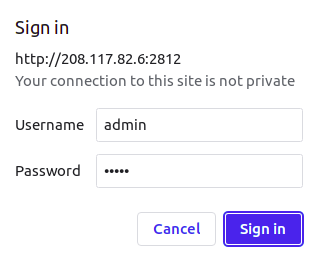
输入您的用户名和密码,然后点击“登录”(Sign in)按钮。您将在以下界面中看到 Monit 仪表盘:
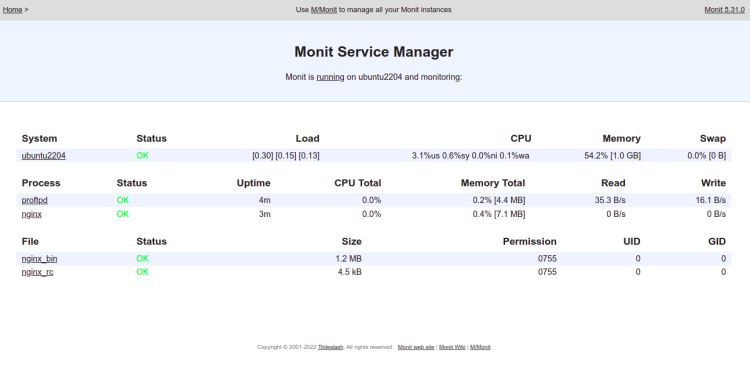
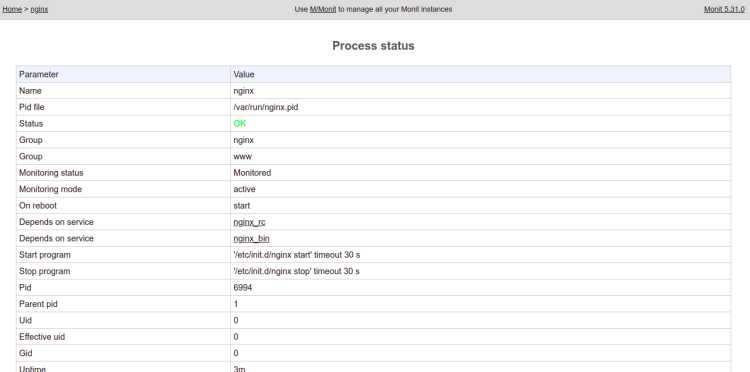
点击 Nginx 服务。您将在以下界面中看到 Nginx 的详细信息:
通过命令行监控 Monit
Monit 还允许您通过命令行界面监控所有已配置的服务。
要快速查看 Monit 的摘要信息,请运行以下命令:
monit summary您应该会看到类似以下的输出:
Monit 5.31.0 uptime: 0m
????????????????????????????????????????????????????????????????????????????????
? Service Name                    ? Status                     ? Type          ?
????????????????????????????????????????????????????????????????????????????????
? ubuntu2204                      ? OK                         ? System        ?
????????????????????????????????????????????????????????????????????????????????
? proftpd                         ? OK                         ? Process       ?
????????????????????????????????????????????????????????????????????????????????
? nginx                           ? OK                         ? Process       ?
????????????????????????????????????????????????????????????????????????????????
? nginx_bin                       ? OK                         ? File          ?
????????????????????????????????????????????????????????????????????????????????
? nginx_rc                        ? OK                         ? File          ?
????????????????????????????????????????????????????????????????????????????????
您也可以使用以下命令查看所有服务的状态:
monit status您将在以下输出中获取所有服务的详细信息:
Monit 5.31.0 uptime: 0m

Process 'proftpd'
  status                       OK
  monitoring status            Monitored
  monitoring mode              active
  on reboot                    start
  pid                          6806
  parent pid                   1
  uid                          0
  effective uid                115
  gid                          65534
  uptime                       2m
  threads                      1
  children                     0
  cpu                          -
  cpu total                    -
  memory                       0.2% [3.4 MB]
  memory total                 0.2% [3.4 MB]
  security attribute           unconfined
  filedescriptors              5 [0.5% of 1024 limit]
  total filedescriptors        5
  read bytes                   0 B/s [2.3 kB total]
  disk read bytes              0 B/s [0 B total]
  disk read operations         0.0 reads/s [17 reads total]
  write bytes                  0 B/s [2.1 kB total]
  disk write bytes             0 B/s [4 kB total]
  disk write operations        0.0 writes/s [8 writes total]
  port response time           3.791 ms to localhost:21 type TCP/IP protocol FTP
  data collected               Mon, 01 Aug 2022 04:34:49

Process 'nginx'
  status                       OK
  monitoring status            Monitored
  monitoring mode              active
  on reboot                    start
  pid                          6994
  parent pid                   1
  uid                          0
  effective uid                0
  gid                          0
  uptime                       1m
  threads                      1
  children                     1
  cpu                          -
  cpu total                    -
  memory                       0.1% [1.7 MB]
  memory total                 0.4% [7.1 MB]
  security attribute           unconfined
  filedescriptors              10 [1.0% of 1024 limit]
  total filedescriptors        21
  read bytes                   0 B/s [0 B total]
  disk read bytes              0 B/s [0 B total]
  disk read operations         0.0 reads/s [0 reads total]
  write bytes                  0 B/s [0 B total]
  disk write bytes             0 B/s [0 B total]
  disk write operations        0.0 writes/s [0 writes total]
  data collected               Mon, 01 Aug 2022 04:34:49

File 'nginx_bin'
  status                       OK
  monitoring status            Monitored
  monitoring mode              active
  on reboot                    start
  permission                   755
  uid                          0
  gid                          0
  size                         1.2 MB
  access timestamp             Mon, 01 Aug 2022 04:17:26
  change timestamp             Mon, 01 Aug 2022 04:17:24
  modify timestamp             Wed, 27 Apr 2022 10:56:57
  checksum                     8ae236b8cfaa5ba5f471ab7fba65700d (MD5)
  data collected               Mon, 01 Aug 2022 04:34:49

File 'nginx_rc'
  status                       OK
  monitoring status            Monitored
  monitoring mode              active
  on reboot                    start
  permission                   755
  uid                          0
  gid                          0
  size                         4.5 kB
  access timestamp             Mon, 01 Aug 2022 04:17:24
  change timestamp             Mon, 01 Aug 2022 04:17:24
  modify timestamp             Tue, 06 Nov 2018 19:04:12
  checksum                     290f6f12a12bc8e882bc5af46c1bfe7c (MD5)
  data collected               Mon, 01 Aug 2022 04:34:49

System 'ubuntu2204'
  status                       OK
  monitoring status            Monitored
  monitoring mode              active
  on reboot                    start
  load average                 [0.02] [0.11] [0.12]
  cpu                          0.0%usr 0.0%sys 0.0%nice 0.0%iowait 0.0%hardirq 0.0%softirq 0.0%steal 0.0%guest 0.0%guestnice
  memory usage                 1.0 GB [54.2%]
  swap usage                   0 B [0.0%]
  uptime                       33m
  boot time                    Mon, 01 Aug 2022 04:02:09
  filedescriptors              1760 [0.0% of 9223372036854775807 limit]
  data collected               Mon, 01 Aug 2022 04:34:49
总结
恭喜!您已成功在 Ubuntu 22.04 上安装并配置了 Monit 监控工具。现在您可以探索 Monit 的各项功能,添加更多服务,并通过 Web 浏览器对它们进行监控。如果您有任何疑问,欢迎随时向我提问。