
本页内容
- Linux pidof 命令
- 问题1:如何使用 pidof 命令?
- 问题2:如何让 pidof 只返回单个 pid?
- 问题3:如何根据根目录限制输出?
- 问题4:当二进制文件位于网络文件系统时如何使用 pidof?
- 问题5:pidof 的内部工作原理是什么?
- 总结
Linux 命令行提供了许多用于处理进程的实用工具。Linux 中的 pidof 命令是一个用于识别一个或多个运行进程进程 ID(PID)的实用工具。有时需要知道某个进程的 PID,以便使用其他命令与之交互;pidof 允许你按进程名称进行搜索并快速获取其对应的 PID,从而使这项任务变得更加简单。pidof 通常包含在大多数 Linux 发行版中,并且可以通过命令行使用。
在本教程中,我们将通过一些易于理解的示例来探讨 pidof 的基本用法。在此之前,值得一提的是,本文中的所有示例均在 Ubuntu 22.04 LTS 机器上进行了测试。
Linux pidof 命令
如上所述,pidof 命令可以让你查找正在运行的程序的进程 ID。其语法如下:
pidof [options] command以下是手册页中关于该工具的说明:
       Pidof finds the process id's (pids) of the named  programs.  It  prints
       those id's on the standard output. This program is on some systems used
       in run-level change scripts, especially when the system has a  System-V
       like   rc  structure.  In  that  case  these  scripts  are  located  in
       /etc/rc?.d, where ? is the runlevel. If the system  has  a  start-stop-
       daemon (8) program that should be used instead.
下面是一些问答形式的示例,能让你很好地了解该工具的工作方式。
问题1:如何使用 pidof 命令?
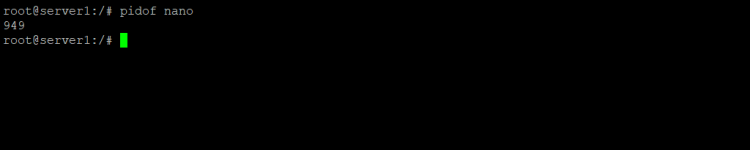
基本用法相当简单——只需将程序名称作为命令的输入即可。例如:
pidof nano因此你可以看到,命令在输出中返回了 nano 的进程 ID。
问题2:如何让 pidof 只返回单个 pid?
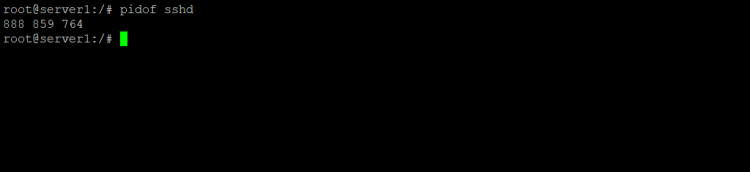
有时你会看到 pidof 命令返回多个 pid。例如,尝试以 ssh 守护进程作为输入来运行 pidof 命令。
pidof sshd以下是我系统上产生的输出:
作为对比,以下是 ps 命令列出这些进程的方式:

不过,你可以强制该工具在输出中只产生单个 PID。这可以通过 -s 命令行选项来实现。
pidof -s sshd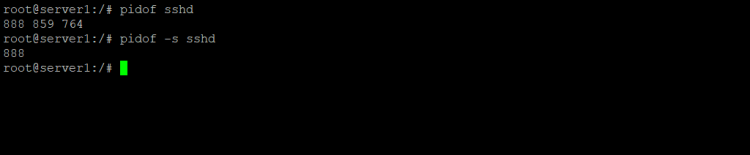
问题3:如何根据根目录限制输出?
如果你希望 pidof 只返回与相同根目录一起运行的进程 ID,请使用 -c 命令行选项。
pidof -c program_name请注意,该选项对普通用户(非 root)会被忽略,因为他们无法检查其所不拥有的进程的当前根目录。
问题4:当二进制文件位于网络文件系统时如何使用 pidof?
在处理位于 NFS 等基于网络的文件系统上的二进制文件时,可以使用 -n 命令行选项,使 pidof 命令避免调用 stat 系统函数。
pidof -n program_name请注意,手册页建议:“可以设置并导出变量 PIDOF_NETFS,而不必使用此选项。”
问题5:pidof 的内部工作原理是什么?
官方文档指出,pidof 实际上与 killall 是同一个程序。该程序会根据被调用时所用的名称来表现。以下是手册页的准确说明:
       When pidof is invoked with a full pathname to the program it should
       find the pid of, it is reasonably safe. Otherwise it is  possible  that
       it  returns  pids of running programs that happen to have the same name
       as the program you're after but are actually other programs. Note  that
       that  the executable name of running processes is calculated with read?
       link(2), so symbolic links to executables will also match.
总结
pidof 命令在许多情况下都可能派上用场。例如,如果你想终止一个你不知道其 PID 的进程,可以迅速使用此工具找到进程 ID,从而立即终止该进程。pidof 命令提供的选项并不多,而我们已经在这里讨论了其中大部分。如需更多信息,请查阅该工具的手册页。