
本页内容
- 先决条件
- 我们要做什么?
- 使用 CloudFormation 创建一个 RDS MySql 实例。
AWS 关系数据库服务(RDS AWS)是一项 Web 服务,可让您更轻松地在云中设置和运营关系数据库。要了解更多关于 RDS 的信息,请搜索" How to setup an RDS MySql (Relation Database MySql ) instance on AWS "这篇文章。
AWS CloudFormation 允许我们使用编程语言(yaml/json)或一个简单的文本文件来建模和配置应用程序所需的所有资源。这为我们的 AWS 资源提供了单一的真实来源。
在本文中,我们将了解使用 CloudFormation Stack 创建 RDS MySql 实例的步骤。
先决条件
- AWS 账户(如果没有,请创建一个)。
- 对 CloudFormation Stack 有基本了解。
- 对 AWS 上的 RDS MySql(Relation Database MySql)实例有基本了解。
我们要做什么?
- 登录 AWS。
- 使用 CloudFormation Stack 创建一个 RDS MySql 实例
登录 AWS
- 点击此处前往 AWS 登录页面。
当我们点击上面的链接时,我们将看到如下网页,需要在其中使用登录信息进行登录。
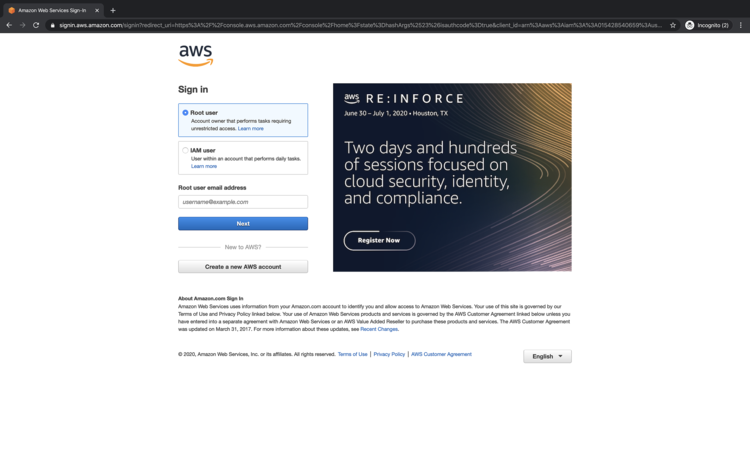
成功登录 AWS 后,我们将看到列出所有服务的主控制台。
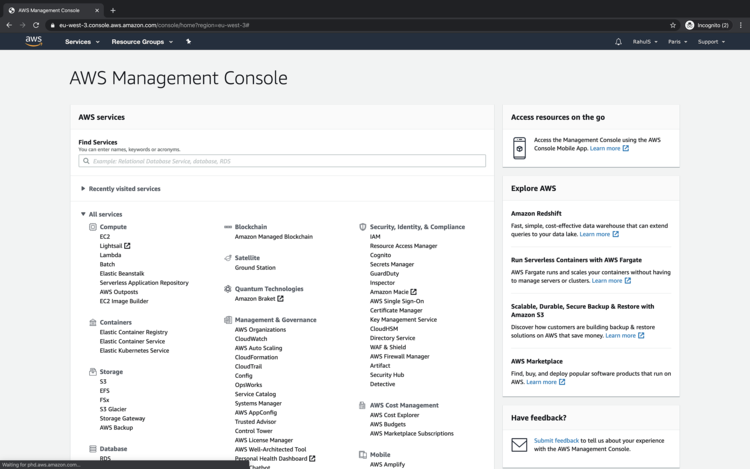
使用 CloudFormation 创建一个 RDS MySql 实例。
在使用 CloudFormation Stack 创建实例之前,请复制以下代码块中的代码,或从此处下载模板并保存到本地计算机上。
---
AWSTemplateFormatVersion: '2010-09-09'
Description: This stack creates an RDS MySql 5.7 Instance
Parameters:
  Owner:
    Description: Enter the Name of the owner for this Stack.
    Type: String
    Default: Name
  VPC:
    Description: Select VPC form the available VPCs in your account.
    Type: AWS::EC2::VPC::Id
  PrivateSubnet1:
    Description: Select Private Subnet 1.
    Type: AWS::EC2::Subnet::Id
  PrivateSubnet2:
    Description: Select Private Subnet 2.
    Type: AWS::EC2::Subnet::Id
  PrivateSubnet3:
    Description: Select Private Subnet 3.
    Type: AWS::EC2::Subnet::Id
  MasterUsername:
    Description: Database administration name.
    Type: String
    Default: rdsroot
  MasterUserPassword:
    NoEcho: 'true'
    Description: Database administration password.
    Type: String
    MinLength: '8'
    AllowedPattern: "[a-zA-Z0-9!?]*"
    ConstraintDescription: Must only contain upper and lowercase letters and numbers
  BackupRetentionPeriod:
    Description: Enter Backup Retention Period in Days.
    Type: Number
    Default: '5'
  MultiAvailabilityZone:
    Description: Do you want to Enable Multi Availability Zones?
    Type: String
    Default: 'true'
    AllowedValues:
    - 'true'
    - 'false'
  TcpPort:
    Description: Enter RDS Listening TCP Port number.
    Type: Number
    Default: '3306'
  PreferredBackupWindow:
    Description: Enter Preferred Backup Window Time.
    Type: String
    Default: 15:00-17:00
  PreferredMaintenanceWindow:
    Description: Enter Preferred Maintenance Window Time.
    Type: String
    Default: Sun:18:00-Sun:22:00
  AllocatedStorage:
    Default: '15'
    Description: Enter the size of the database (Gb)
    Type: Number
    MinValue: '5'
    MaxValue: '6144'
    ConstraintDescription: Must be between 5-6144
  SnapshotOnDelete:
    Description: Do you want to create a Snapshot on instance delete?
    Type: String
    Default: 'true'
    AllowedValues:
    - 'true'
    - 'false'
  AutoMinorVersionUpgrade:
    Description: Do you want to allow automatic minor version upgrade?
    Type: String
    Default: 'true'
    AllowedValues:
    - 'true'
    - 'false'
  InstanceType:
    Description: Select Instance Type.
    Type: String
    Default: db.t2.micro
    ConstraintDescription: Must be a valid EC2 instance type.
Mappings:
  Settings:
    MySQL:
      Engine: MySQL
      Version: '5.7'
Conditions:
  ConfigureSnapshotOnDelete:
    Fn::Equals:
    - Ref: SnapshotOnDelete
    - 'true'

Metadata:
  AWS::CloudFormation::Interface:
    ParameterGroups:
    - Label:
        default: Ownership
      Parameters:
      - Owner
    - Label:
        default: Network Configuration
      Parameters:
      - VPC
      - PrivateSubnet1
      - PrivateSubnet2
      - PrivateSubnet3
    - Label:
        default: RDS Configuration
      Parameters:
      - InstanceType
      - MasterUsername
      - MasterUserPassword
      - BackupRetentionPeriod
      - PreferredBackupWindow
      - PreferredMaintenanceWindow
      - SnapshotOnDelete
      - AllocatedStorage
      - AutoMinorVersionUpgrade
      - TcpPort
      - MultiAvailabilityZone
    ParameterLabels:
      Owner:
        default: Team or Individual Owner
      InstanceType:
        default: Instance Type
      PrivateSubnet1:
        default: Private Subnet 1
      PrivateSubnet2:
        default: Private Subnet 2
      PrivateSubnet3:
        default: Private Subnet 3
      MasterUsername:
        default: Master Username
      MasterUserPassword:
        default: Master User Password
      BackupRetentionPeriod:
        default: Backup Retention Period
      PreferredBackupWindow:
        default: Preferred Backup Window
      PreferredMaintenanceWindow:
        default: Preferred Maintenance Window
      AllocatedStorage:
        default: Allocated Storage
      AutoMinorVersionUpgrade:
        default: Auto Minor Version Upgrade
      TcpPort:
        default: TCP Port
      MultiAvailabilityZone:
        default: Multi Availability Zone?
      SnapshotOnDelete:
        default: Snapshot On Delete?

Resources:
  RDSAccessSecurityGroup:
    Type: AWS::EC2::SecurityGroup
    Properties:
      GroupDescription: Instance to RDS Access
      VpcId:
        Ref: VPC
      Tags:
      - Key: Name
        Value:
          Fn::Join:
          - ''
          - - Ref: AWS::StackName
            - "-rds"
      - Key: Owner
        Value:
          Ref: Owner
  AccessSecurityGroupIngress:
    Type: AWS::EC2::SecurityGroupIngress
    DependsOn: RDSAccessSecurityGroup
    Properties:
      GroupId:
        Ref: RDSAccessSecurityGroup
      IpProtocol: tcp
      FromPort:
        Ref: TcpPort
      ToPort:
        Ref: TcpPort
      SourceSecurityGroupId:
        Ref: RDSAccessSecurityGroup
  DbSubnetGroup:
    Type: AWS::RDS::DBSubnetGroup
    Properties:
      DBSubnetGroupDescription:
        Fn::Join:
        - ''
        - - 'RDS Subnet Group for '
          - Ref: AWS::StackName
      SubnetIds:
      - Ref: PrivateSubnet1
      - Ref: PrivateSubnet2
      - Ref: PrivateSubnet3
      Tags:
      - Key: Name
        Value:
          Ref: AWS::StackName
      - Key: Owner
        Value:
          Ref: Owner
  DbInstance:
    Type: AWS::RDS::DBInstance
    DeletionPolicy: Snapshot
    DependsOn:
    - DbSubnetGroup
    - RDSAccessSecurityGroup
    Properties:
      AllocatedStorage:
        Ref: AllocatedStorage
      AllowMajorVersionUpgrade: 'false'
      AutoMinorVersionUpgrade:
        Ref: AutoMinorVersionUpgrade
      BackupRetentionPeriod:
        Ref: BackupRetentionPeriod
      DBInstanceClass:
        Ref: InstanceType
      DBInstanceIdentifier:
        Ref: AWS::StackName
      DBSubnetGroupName:
        Ref: DbSubnetGroup
      Engine:
        Fn::FindInMap:
        - Settings
        - MySQL
        - Engine
      EngineVersion:
        Fn::FindInMap:
        - Settings
        - MySQL
        - Version
      MasterUsername:
        Ref: MasterUsername
      MasterUserPassword:
        Ref: MasterUserPassword
      MultiAZ:
        Ref: MultiAvailabilityZone
      Port:
        Ref: TcpPort
      PreferredBackupWindow:
        Ref: PreferredBackupWindow
      PreferredMaintenanceWindow:
        Ref: PreferredMaintenanceWindow
      PubliclyAccessible: 'false'
      StorageEncrypted: 'false'
      StorageType: gp2
      VPCSecurityGroups:
      - Ref: RDSAccessSecurityGroup
      Tags:
      - Key: Name
        Value:
          Ref: AWS::StackName
      - Key: Owner
        Value:
          Ref: Owner

Outputs:
  Owner:
    Description: Team or Individual that Owns this Formation.
    Value:
      Ref: Owner
  VPC:
    Description: VPC Used
    Value:
      Ref: VPC
  RDSHostname:
    Description: RDS Hostname
    Value:
      Fn::GetAtt:
      - DbInstance
      - Endpoint.Address
  RDSPort:
    Description: RDS Port
    Value:
      Fn::GetAtt:
      - DbInstance
      - Endpoint.Port
  DbSubnetGroup:
    Description: DB Subnet Group Created.
    Value:
      Ref: DbSubnetGroup
  RDSAccessSecurityGroup:
    Description: RDS Access Security Group Created.
    Value:
      Ref: RDSAccessSecurityGroup
  PrivateSubnet1:
    Description: Private Subnet 1 Deployment
    Value:
      Ref: PrivateSubnet1
  PrivateSubnet2:
    Description: Private Subnet 2 Deployment
    Value:
      Ref: PrivateSubnet2
  PrivateSubnet3:
    Description: Private Subnet 3 Deployment
    Value:
      Ref: PrivateSubnet3
  BackupRetentionPeriod:
    Description: Backup Retention Period in Days
    Value:
      Ref: BackupRetentionPeriod
  MultiAvailabilityZone:
    Description: Enable Multi Availability Zones?
    Value:
      Ref: MultiAvailabilityZone
  SnapshotOnDelete:
    Description: Create Snapshot on Delete?
    Value:
      Ref: SnapshotOnDelete
  PreferredBackupWindow:
    Description: Preferred Backup Window
    Value:
      Ref: PreferredBackupWindow
  PreferredMaintenanceWindow:
    Description: Preferred Maintenance Window
    Value:
      Ref: PreferredMaintenanceWindow
  AllocatedStorage:
    Description: Allocated Storage in GB
    Value:
      Ref: AllocatedStorage
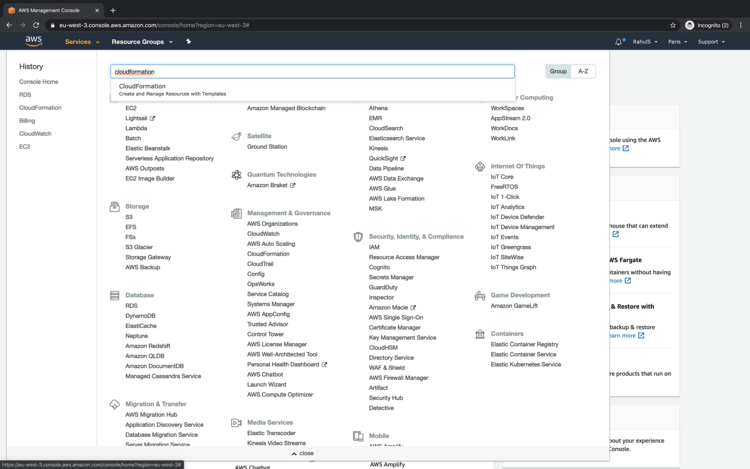
在本地计算机上获得模板后,前往 AWS 控制台,点击顶部菜单栏中的" Services",然后搜索" CloudFormation"。
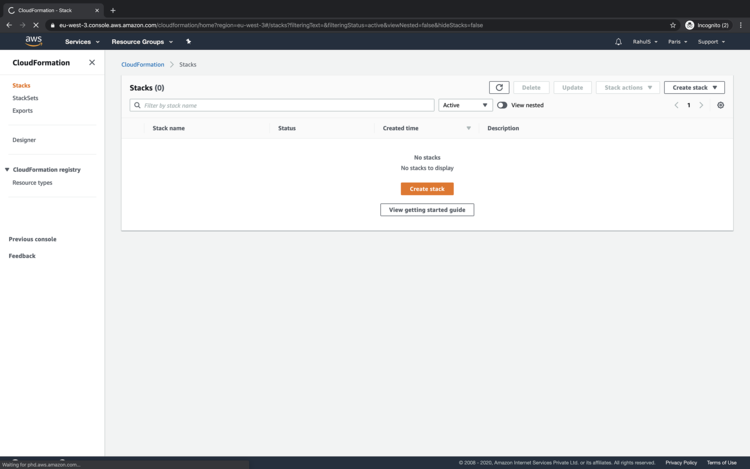
您将看到如下的 CloudFormation 主仪表板。点击" Create Stack"按钮创建一个堆栈,以创建 RDS MySql 实例。
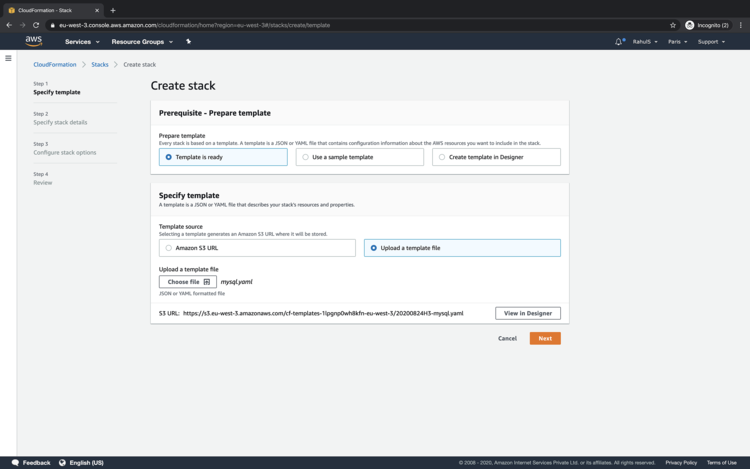
点击" Upload a template file"单选按钮,选择您从本地计算机保存的模板,然后点击" Next"按钮。
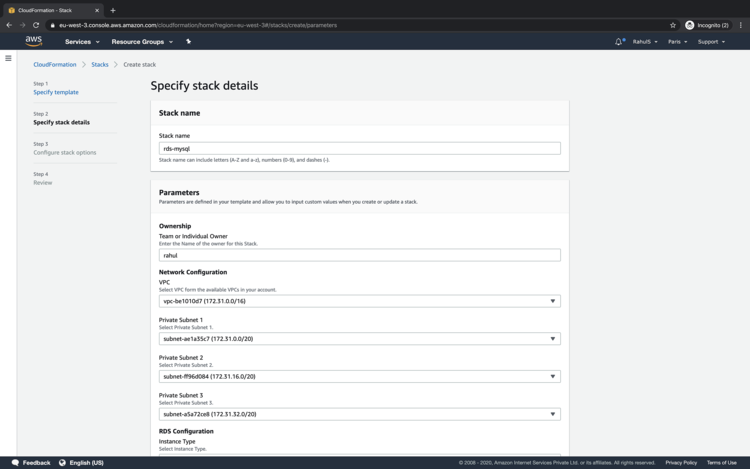
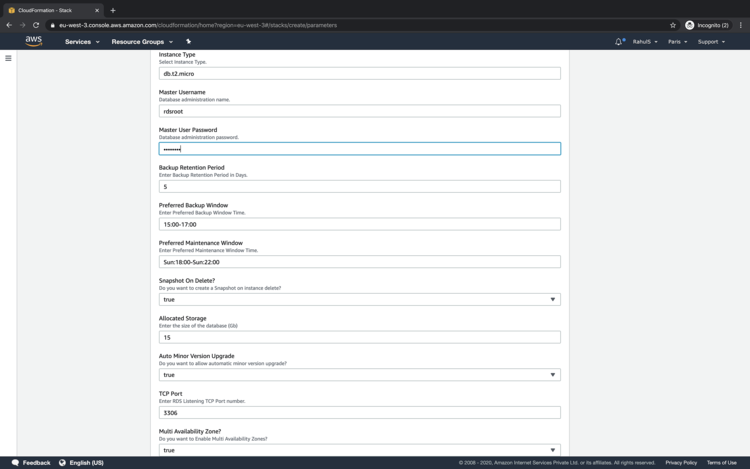
为堆栈指定一个您选择的名称,填写所需的详细信息,然后点击" Next"以继续。
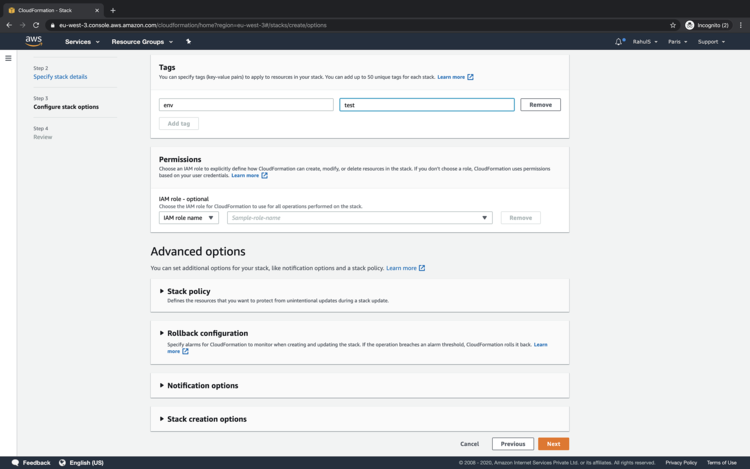
您可以为 CloudFormation Stack 提供标签,这些标签将应用于由该堆栈创建的 RDS MySql 实例。点击" Next"以继续。
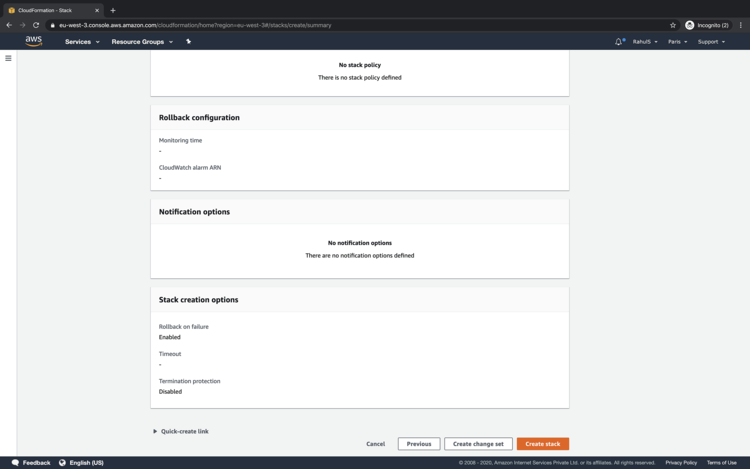
向下滚动并点击" Create stack"以创建堆栈。
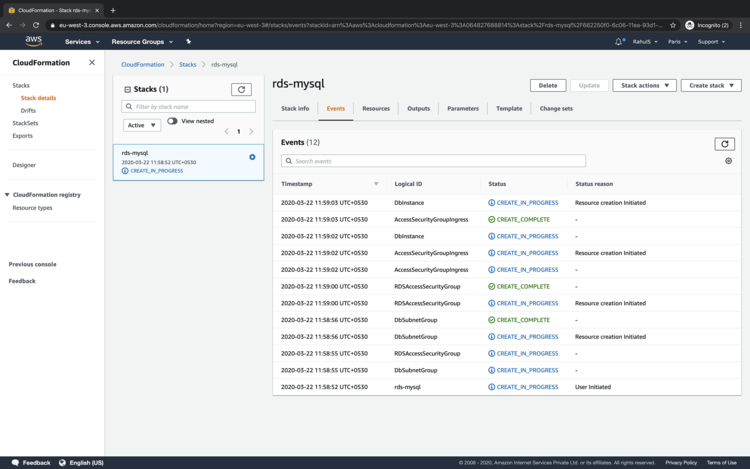
创建过程需要一些时间。您可以在 events 下查看正在执行的操作。
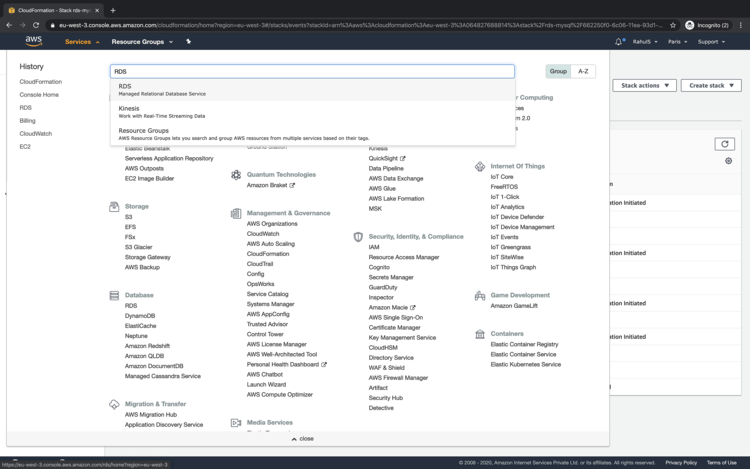
要查看正在创建的 RDS MySql 实例的状态,请点击" Services"并搜索" RDS"。
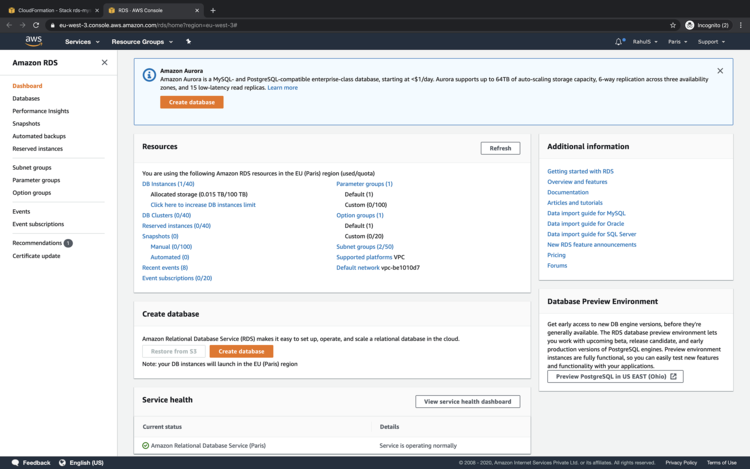
在主仪表板上,点击" DB Instances"。
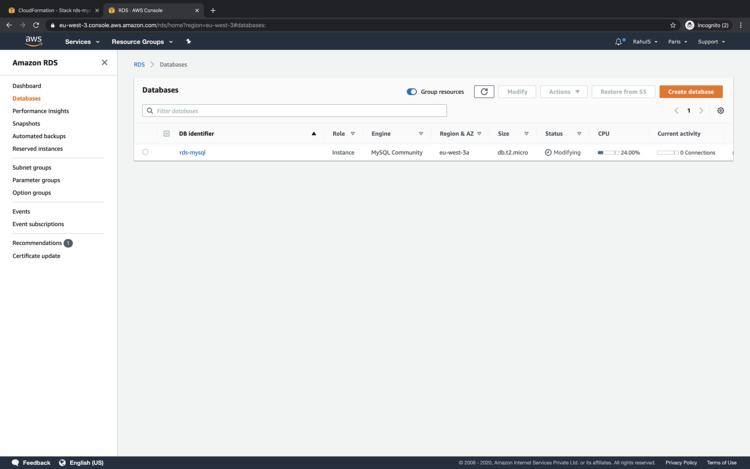
在这里,您可以看到实例的状态为" Modifying"。这需要一些时间来创建并准备就绪。
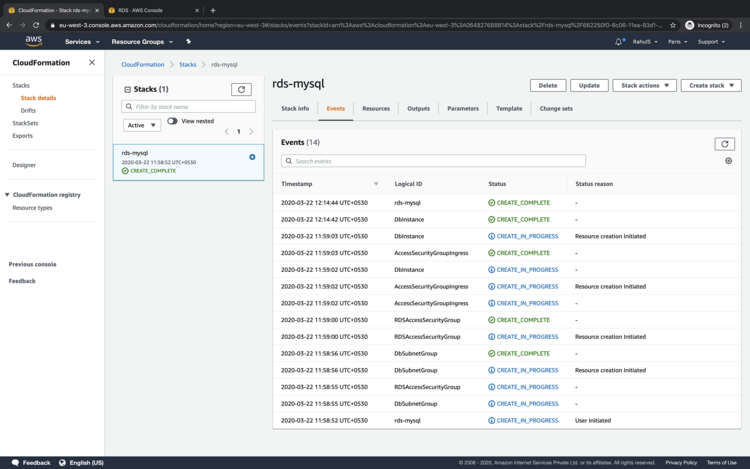
在 CloudFormation Stack 事件中,您可以看到,一段时间后,一旦 RDS MySql 实例创建完成,状态即为" CREATE_COMPLETE"
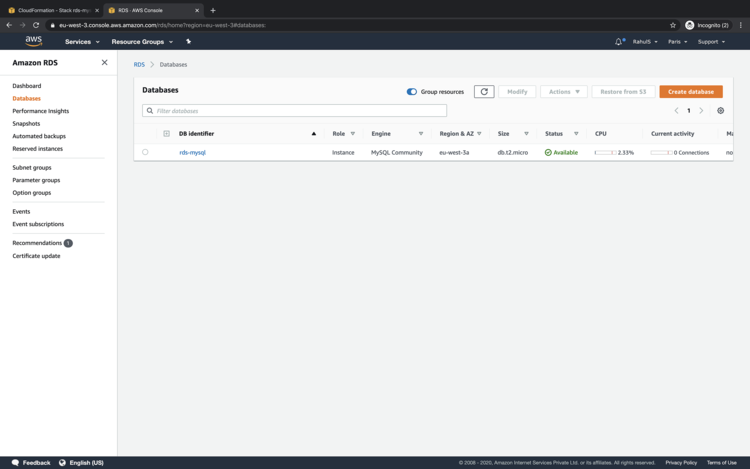
在 RDS 控制台中,现在您可以看到状态为" Available"。
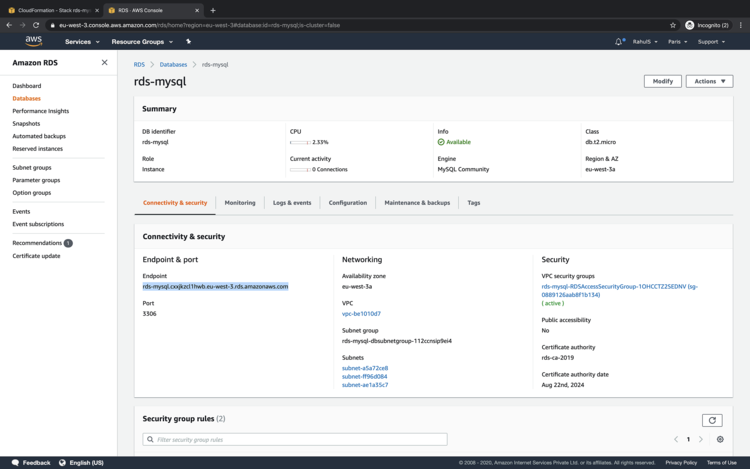
要查看有关 RDS MySql 实例的更多详细信息,请点击 RDS MySql 实例 --> Connectivity & Security。
要连接到 RDS MySql 实例,您可以使用该实例提供的 Endpoint。
当不再需要该实例时,请从 CloudFormation 主仪表板删除 CloudFormation Stack,以节省成本。
结论
在本文中,我们了解了使用 CloudFormation Stack 创建 RDS MySql 实例的步骤。