
本教程适用于以下操作系统版本
- Ubuntu 22.04(Jammy Jellyfish)
- Ubuntu 18.04(Bionic Beaver)
本页内容
- 先决条件
- 在 Ubuntu 22.04 上安装 ProFTPD
- 创建 FTP 用户
- 为 FTP 生成 SSL/TLS
- 配置 ProFTPD
- 访问 ProFTPD 服务器
- 结语
ProFTPD 是一款免费、开源且功能丰富的 FTP 服务器,专为 Unix 及类 Unix 操作系统编写。它是一个安全、高性能且高度可配置的文件传输协议,允许您通过互联网上传和下载文件。它是开源软件,并支持用于安全连接的 TLS(SSL)。
本教程将向您展示如何在 Ubuntu 22.04 上安装 ProFTPD FTP 服务器。
先决条件
- 一台运行 Ubuntu 22.04 的服务器。
- 服务器上已配置 root 密码。
在 Ubuntu 22.04 上安装 ProFTPD
默认情况下,ProFTPD 软件包已包含在 Ubuntu 默认软件源中。您可以使用以下命令轻松安装它:
apt install proftpd -yProFTPD 软件包安装完成后,使用以下命令启动 ProFTPD 服务:
systemctl start proftpd您可以使用以下命令查看 ProFTPD 的状态:
systemctl status proftpd您将看到如下输出:
? proftpd.service - ProFTPD FTP Server
     Loaded: loaded (/lib/systemd/system/proftpd.service; enabled; vendor preset: enabled)
     Active: active (running) since Tue 2022-10-11 14:33:27 UTC; 16s ago
   Main PID: 5668 (proftpd)
      Tasks: 1 (limit: 2242)
     Memory: 4.4M
        CPU: 57ms
     CGroup: /system.slice/proftpd.service
             ??5668 "proftpd: (accepting connections)" "" "" "" "" "" "" "" "" "" "" "" "" "" ""

Oct 11 14:33:26 ubuntu2204 systemd[1]: Starting ProFTPD FTP Server...
Oct 11 14:33:26 ubuntu2204 proftpd[5666]: Checking syntax of configuration file
Oct 11 14:33:27 ubuntu2204 systemd[1]: proftpd.service: Can't open PID file /run/proftpd.pid (yet?) after start: Operation not permitted
Oct 11 14:33:27 ubuntu2204 systemd[1]: Started ProFTPD FTP Server.
您可以使用以下命令查看 ProFTPD 版本:
proftpd --version您应该会看到如下输出:
ProFTPD Version 1.3.7c
创建 FTP 用户
接下来,您需要为 FTP 创建一个用户。您可以使用以下命令创建:
adduser ftpuser按如下方式为该用户设置密码:
Adding user `ftpuser' ...
Adding new group `ftpuser' (1000) ...
Adding new user `ftpuser' (1000) with group `ftpuser' ...
Creating home directory `/home/ftpuser' ...
Copying files from `/etc/skel' ...
New password:
Retype new password:
passwd: password updated successfully
Changing the user information for ftpuser
Enter the new value, or press ENTER for the default
	Full Name []:
	Room Number []:
	Work Phone []:
	Home Phone []:
	Other []:
Is the information correct? [Y/n] Y
为 FTP 生成 SSL/TLS
要借助 SSL/TLS 保护 FTP 连接,您需要为 ProFTPD 生成 SSL/TLS。
首先,使用以下命令安装 OpenSSL 软件包:
apt-get install openssl -y接下来,使用以下命令生成 SSL/TLS 证书:
openssl req -x509 -newkey rsa:1024 -keyout /etc/ssl/private/proftpd.key -out /etc/ssl/certs/proftpd.crt -nodes -days 365系统将要求您提供证书信息,如下所示:
......................++++++++++++++++++++++++++++++++++++++++++++++++++++++++++++++++
.++++++++++++++++++++++++++++++++++++++++++++++++++++++++++++++++
-----
You are about to be asked to enter information that will be incorporated
into your certificate request.
What you are about to enter is what is called a Distinguished Name or a DN.
There are quite a few fields but you can leave some blank
For some fields there will be a default value,
If you enter '.', the field will be left blank.
-----
Country Name (2 letter code) [AU]:IN
State or Province Name (full name) [Some-State]:GUJ
Locality Name (eg, city) []:JUN
Organization Name (eg, company) [Internet Widgits Pty Ltd]:IT
Organizational Unit Name (eg, section) []:ITC
Common Name (e.g. server FQDN or YOUR name) []:HITESH
Email Address []:
[email protected]
接下来,为生成的证书设置正确的权限:
chmod 600 /etc/ssl/private/proftpd.key
chmod 600 /etc/ssl/certs/proftpd.crt
配置 ProFTPD
接下来,您需要编辑 ProFTPD 配置文件并修改默认设置:
nano /etc/proftpd/proftpd.conf修改以下配置:
UseIPv6 on
ServerName "FTP Server"
Port 21
RequireValidShell on
AuthOrder mod_auth_pam.c* mod_auth_unix.c
Include /etc/proftpd/tls.conf
保存并关闭文件,然后编辑 TLS 配置文件并定义您的 SSL 证书:
nano /etc/proftpd/tls.conf修改以下行:
TLSEngine                               on
TLSRSACertificateFile                   /etc/ssl/certs/proftpd.crt
TLSRSACertificateKeyFile                /etc/ssl/private/proftpd.key
TLSLog /var/log/proftpd/tls.log
TLSProtocol SSLv23
TLSRequired on
保存并关闭文件,然后重启 ProFTPD 服务以应用更改:
systemctl restart proftpd访问 ProFTPD 服务器
至此,ProFTPD 服务器已安装并借助 SSL/TLS 完成加固。现在,是时候使用 FileZilla FTP 客户端来访问它了。
前往远程系统并打开 FileZilla。您应该会看到如下界面:
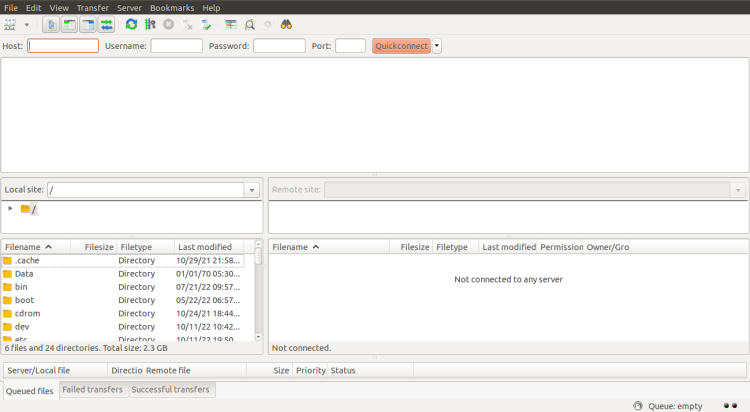
点击“创建新连接”。您应该会看到如下界面:
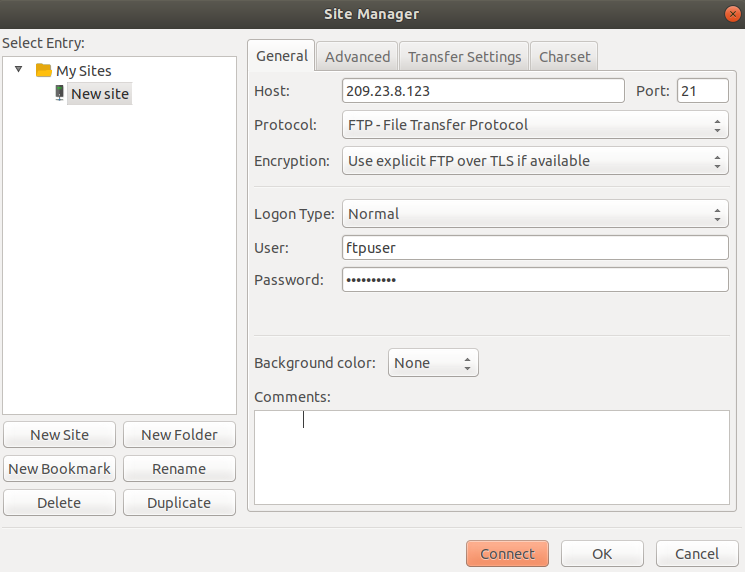
输入您的 FTP 服务器 IP、端口、用户名、密码,然后点击“连接”按钮。FTP 连接建立后,您应该会看到如下界面:
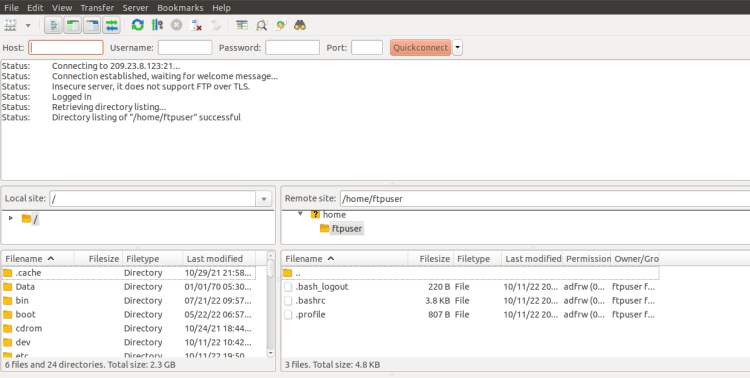
结语
恭喜!您已成功在 Ubuntu 22.04 上安装 ProFTPD 并借助 SSL/TLS 对其进行了加固。现在,您可以通过安全连接轻松地在 FTP 服务器上上传和下载文件。如果您有任何问题,欢迎随时向我提问。