
本页内容
- 先决条件
- 我们要做什么?
- 创建模板
- 创建 Cloudformation 堆栈
- 结论
使用 Cloudformation,我们可以非常轻松地创建和管理 AWS 资源。Cloudformation 可用于通过文本文件管理所有 AWS 资源。Cloudformation 使我们能够创建和建模我们的基础设施和应用程序,而无需手动执行操作。Cloudformation 帮助我们在一个文本文件或模板中管理我们完整的基础设施。Cloudformation 模板是一个采用 JSON 或 YAML 语言编写的格式化文本文件,用于描述我们的 AWS 基础设施。
在本文中,我们将看到一个 Cloudformation,用于创建一个包含 2 个公有子网和 2 个私有子网的 VPC。
先决条件
- AWS 账户(如果没有,请创建一个)。
- 对 Cloudformation 模板有基本了解。
我们要做什么?
- 登录 AWS。
- 创建模板。
- 创建 Cloudformation 堆栈
登录 AWS
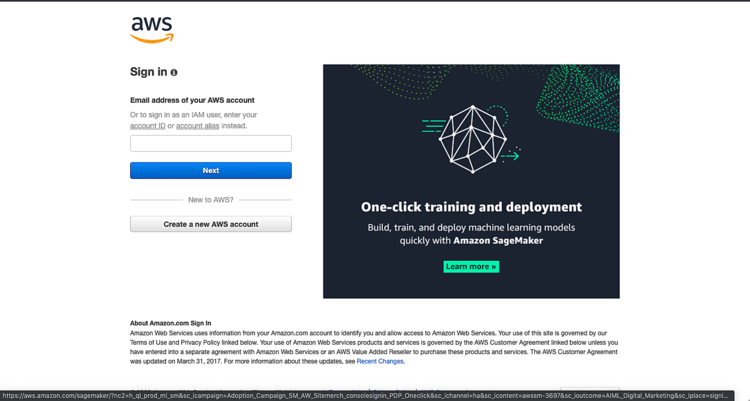
- 点击此处前往 AWS 登录页面。
当我们点击上面的链接时,我们将看到如下网页,需要在此使用我们的登录信息进行登录。
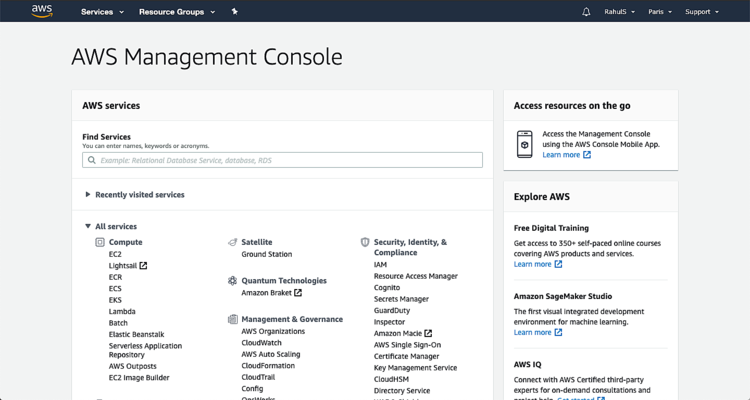
成功登录 AWS 后,我们将看到主控制台,其中列出的所有服务如下所示。
创建模板
在开始创建堆栈之前,我们应先准备一个将用于创建 VPC 的模板。复制以下代码并保存到本地计算机上。
---
AWSTemplateFormatVersion
: 2010-09-09
Description
: >

This Templates creates a VPC with 3 public and 3 private subnets.
Parameters
:

VpcCIDR
:

Type
:
String

Description
:
VPC CIDR (Do Not Change if no customization is required).


Default
:
10.10.0.0/16

PrivateAZ1SubnetCIDR
:

Type
:
String

Description
:
Subnet CIDR for 1st Availability Zone (Do Not Change if no customization is required).

Default
:
10.10.80.0/21

PrivateAZ2SubnetCIDR
:

Type
:
String

Description
:
Subnet CIDR for 2nd Availability Zone (Do Not Change if no customization is required).

Default
:
10.10.88.0/21

PrivateAZ3SubnetCIDR
:

Type
:
String

Description
:
Subnet CIDR for 3rd Availability Zone (Do Not Change if no customization is required).

Default
:
10.10.96.0/21

PublicAZ1SubnetCIDR
:

Type
:
String

Description
:
Subnet CIDR for 1st Availability Zone (Do Not Change if no customization is required).

Default
:
10.10.0.0/21

PublicAZ2SubnetCIDR
:

Type
:
String

Description
:
Subnet CIDR for 2nd Availability Zone (Do Not Change if no customization is required).

Default
:
10.10.8.0/21

PublicAZ3SubnetCIDR
:

Type
:
String

Description
:
Subnet CIDR for 3rd Availability Zone (Do Not Change if no customization is required).


Default
:
10.10.16.0/21
Metadata
:

AWS::CloudFormation::Interface
:

ParameterGroups
:
      -
Label
:

default
:
VPC

Parameters
:
          -
VpcCIDR
      -
Label
:

default
:
Availabilty Zone 1

Parameters
:
          -
PublicAZ1SubnetCIDR
          -
PrivateAZ1SubnetCIDR
      -
Label
:

default
:
Availabilty Zone 1

Parameters
:
          -
PublicAZ2SubnetCIDR
          -
PrivateAZ2SubnetCIDR
      -
Label
:

default
:
Availabilty Zone 1

Parameters
:
          -
PublicAZ3SubnetCIDR
          -
PrivateAZ3SubnetCIDR
Resources
:

Vpc
:

Type
:
AWS::EC2::VPC

Properties
:

CidrBlock
:
!Ref

VpcCIDR

Tags
:
        -
Key
:
Name

Value
:
!Sub

${AWS::StackName}

InternetGateway
:

Type
:
AWS::EC2::InternetGateway

Properties
:

Tags
:
        -
Key
:
Name

Value
:
!Sub

${AWS::StackName}

VPCGatewayAttachment
:

Type
:
AWS::EC2::VPCGatewayAttachment

Properties
:

InternetGatewayId
:
!Ref

InternetGateway

VpcId
:
!Ref

Vpc

# Public Subnets - Route Table

PublicRouteTable
:

Type
:
AWS::EC2::RouteTable

Properties
:

VpcId
:
!Ref

Vpc

Tags
:
        -
Key
:
Name

Value
:
!Sub

${AWS::StackName}-public
        -
Key
:
Type

Value
:
public

PublicSubnetsRoute
:

Type
:
AWS::EC2::Route

Properties
:

RouteTableId
:
!Ref

PublicRouteTable

DestinationCidrBlock
:
0.0.0.0/0

GatewayId
:
!Ref

InternetGateway

DependsOn
:
VPCGatewayAttachment

# Public Subnets

PublicAZ1Subnet
:

Type
:
AWS::EC2::Subnet

Properties
:

VpcId
:
!Ref

Vpc

CidrBlock
:
!Ref

PublicAZ1SubnetCIDR

AvailabilityZone
:
!Select
 [
0
,
!GetAZs

""
]

MapPublicIpOnLaunch
:
true

Tags
:
        -
Key
:
Name

Value
:
!Sub
            -
${AWS::StackName}-public-${AZ}
            - {
AZ
:
!Select
 [
0
,
!GetAZs

""
] }
        -
Key
:
Type

Value
:
public

PublicAZ1SubnetRouteTableAssociation
:

Type
:
AWS::EC2::SubnetRouteTableAssociation

Properties
:

SubnetId
:
!Ref

PublicAZ1Subnet

RouteTableId
:
!Ref

PublicRouteTable

PublicAZ2Subnet
:

Type
:
AWS::EC2::Subnet

Properties
:

VpcId
:
!Ref

Vpc

CidrBlock
:
!Ref

PublicAZ2SubnetCIDR

AvailabilityZone
:
!Select
 [
1
,
!GetAZs

""
]

MapPublicIpOnLaunch
:
true

Tags
:
        -
Key
:
Name

Value
:
!Sub
            -
${AWS::StackName}-public-${AZ}
            - {
AZ
:
!Select
 [
1
,
!GetAZs

""
] }
        -
Key
:
Type

Value
:
public

PublicAZ2SubnetRouteTableAssociation
:

Type
:
AWS::EC2::SubnetRouteTableAssociation

Properties
:

SubnetId
:
!Ref

PublicAZ2Subnet

RouteTableId
:
!Ref

PublicRouteTable

PublicAZ3Subnet
:

Type
:
AWS::EC2::Subnet

Properties
:

VpcId
:
!Ref

Vpc

CidrBlock
:
!Ref

PublicAZ3SubnetCIDR

AvailabilityZone
:
!Select
 [
2
,
!GetAZs

""
]

MapPublicIpOnLaunch
:
true

Tags
:
        -
Key
:
Name

Value
:
!Sub
            -
${AWS::StackName}-public-${AZ}
            - {
AZ
:
!Select
 [
2
,
!GetAZs

""
] }
        -
Key
:
Type

Value
:
public

PublicAZ3SubnetRouteTableAssociation
:

Type
:
AWS::EC2::SubnetRouteTableAssociation

Properties
:

SubnetId
:
!Ref

PublicAZ3Subnet

RouteTableId
:
!Ref

PublicRouteTable

# Private Subnets - NAT Gateways

AZ1NatGatewayEIP
:

Type
:
AWS::EC2::EIP

Properties
:

Domain
:
vpc

DependsOn
:
VPCGatewayAttachment

AZ1NatGateway
:

Type
:
AWS::EC2::NatGateway

Properties
:

AllocationId
:
!GetAtt

AZ1NatGatewayEIP.AllocationId

SubnetId
:
!Ref

PublicAZ1Subnet

AZ2NatGatewayEIP
:

Type
:
AWS::EC2::EIP

Properties
:

Domain
:
vpc

DependsOn
:
VPCGatewayAttachment

AZ2NatGateway
:

Type
:
AWS::EC2::NatGateway

Properties
:

AllocationId
:
!GetAtt

AZ2NatGatewayEIP.AllocationId

SubnetId
:
!Ref

PublicAZ2Subnet

AZ3NatGatewayEIP
:

Type
:
AWS::EC2::EIP

Properties
:

Domain
:
vpc

DependsOn
:
VPCGatewayAttachment

AZ3NatGateway
:

Type
:
AWS::EC2::NatGateway

Properties
:

AllocationId
:
!GetAtt

AZ3NatGatewayEIP.AllocationId

SubnetId
:
!Ref

PublicAZ3Subnet

# Private Subnets

PrivateAZ1Subnet
:

Type
:
AWS::EC2::Subnet

Properties
:

VpcId
:
!Ref

Vpc

CidrBlock
:
!Ref

PrivateAZ1SubnetCIDR

AvailabilityZone
:
!Select
 [
0
,
!GetAZs

""
]

Tags
:
        -
Key
:
Name

Value
:
!Sub
            -
${AWS::StackName}-private-${AZ}
            - {
AZ
:
!Select
 [
0
,
!GetAZs

""
] }
        -
Key
:
Type

Value
:
private

PrivateAZ1RouteTable
:

Type
:
AWS::EC2::RouteTable

Properties
:

VpcId
:
!Ref

Vpc

Tags
:
        -
Key
:
Name

Value
:
!Sub
            -
${AWS::StackName}-private-${AZ}
            - {
AZ
:
!Select
 [
0
,
!GetAZs

""
] }
        -
Key
:
Type

Value
:
private

PrivateAZ1Route
:

Type
:
AWS::EC2::Route

Properties
:

RouteTableId
:
!Ref

PrivateAZ1RouteTable

DestinationCidrBlock
:
0.0.0.0/0

NatGatewayId
:
!Ref

AZ1NatGateway

PrivateAZ1RouteTableAssociation
:

Type
:
AWS::EC2::SubnetRouteTableAssociation

Properties
:

SubnetId
:
!Ref

PrivateAZ1Subnet

RouteTableId
:
!Ref

PrivateAZ1RouteTable

PrivateAZ2Subnet
:

Type
:
AWS::EC2::Subnet

Properties
:

VpcId
:
!Ref

Vpc

CidrBlock
:
!Ref

PrivateAZ2SubnetCIDR

AvailabilityZone
:
!Select
 [
1
,
!GetAZs

""
]

Tags
:
        -
Key
:
Name

Value
:
!Sub
            -
${AWS::StackName}-private-${AZ}
            - {
AZ
:
!Select
 [
1
,
!GetAZs

""
] }
        -
Key
:
Type

Value
:
private

PrivateAZ2RouteTable
:

Type
:
AWS::EC2::RouteTable

Properties
:

VpcId
:
!Ref

Vpc

Tags
:
        -
Key
:
Name

Value
:
!Sub
            -
${AWS::StackName}-private-${AZ}
            - {
AZ
:
!Select
 [
1
,
!GetAZs

""
] }
        -
Key
:
Type

Value
:
private

PrivateAZ2Route
:

Type
:
AWS::EC2::Route

Properties
:

RouteTableId
:
!Ref

PrivateAZ2RouteTable

DestinationCidrBlock
:
0.0.0.0/0

NatGatewayId
:
!Ref

AZ2NatGateway

PrivateAZ2RouteTableAssociation
:

Type
:
AWS::EC2::SubnetRouteTableAssociation

Properties
:

SubnetId
:
!Ref

PrivateAZ2Subnet

RouteTableId
:
!Ref

PrivateAZ2RouteTable

PrivateAZ3Subnet
:

Type
:
AWS::EC2::Subnet

Properties
:

VpcId
:
!Ref

Vpc

CidrBlock
:
!Ref

PrivateAZ3SubnetCIDR

AvailabilityZone
:
!Select
 [
2
,
!GetAZs

""
]

Tags
:
        -
Key
:
Name

Value
:
!Sub
            -
${AWS::StackName}-private-${AZ}
            - {
AZ
:
!Select
 [
2
,
!GetAZs

""
] }
        -
Key
:
Type

Value
:
private

PrivateAZ3RouteTable
:

Type
:
AWS::EC2::RouteTable

Properties
:

VpcId
:
!Ref

Vpc

Tags
:
        -
Key
:
Name

Value
:
!Sub
            -
${AWS::StackName}-private-${AZ}
            - {
AZ
:
!Select
 [
2
,
!GetAZs

""
] }
        -
Key
:
Type

Value
:
private

PrivateAZ3Route
:

Type
:
AWS::EC2::Route

Properties
:

RouteTableId
:
!Ref

PrivateAZ3RouteTable

DestinationCidrBlock
:
0.0.0.0/0

NatGatewayId
:
!Ref

AZ3NatGateway

PrivateAZ3RouteTableAssociation
:

Type
:
AWS::EC2::SubnetRouteTableAssociation

Properties
:

SubnetId
:
!Ref

PrivateAZ3Subnet

RouteTableId
:
!Ref

PrivateAZ3RouteTable

Outputs
:

VpcId
:

Description
:
VPC Id

Value
:
!Ref

Vpc

Export
:

Name
:
!Sub

"${AWS::StackName}-VPC-ID"
创建 Cloudformation 堆栈
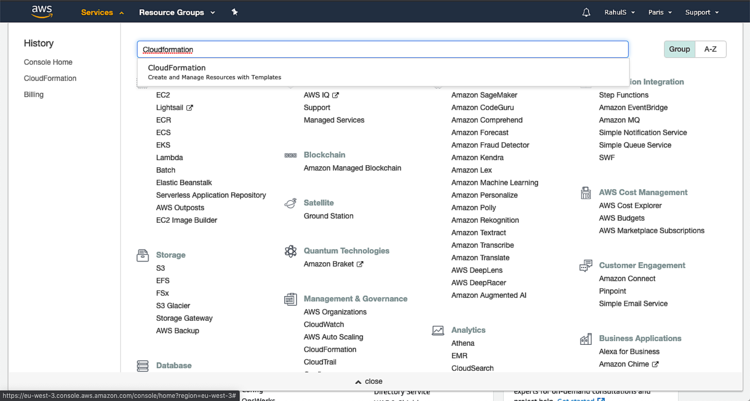
要创建 Cloudformation 堆栈,请点击左上角的“Services”,然后搜索“Cloudformation”。
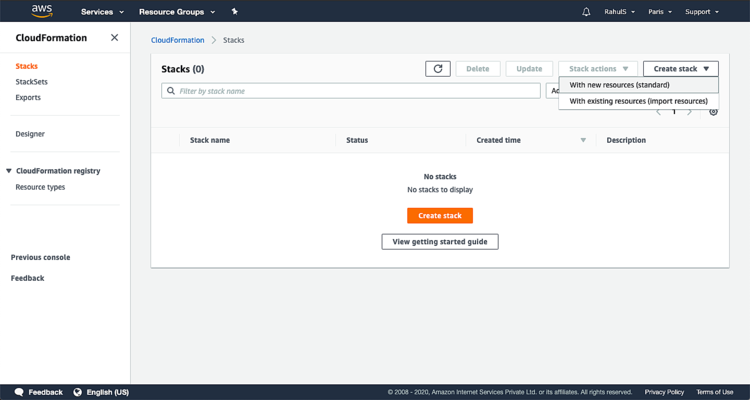
在主仪表板上,点击“Create stack” -> "With new resorces(standard)"。
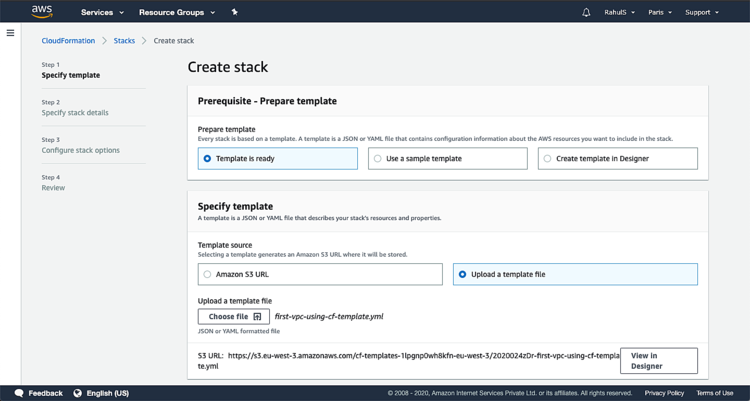
堆栈需要一个模板文件,该文件可以是本地文件,也可以是 S3 Bucket 中的对象文件。由于我们将使用本地模板,请点击“Template is ready” -> “Upload a template file”,点击“Choose file”并选择本地模板文件,然后继续。
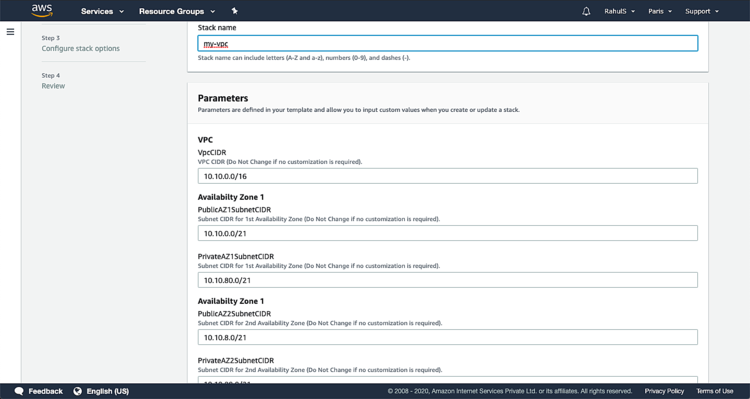
为堆栈命名,其他所有参数保持不变。
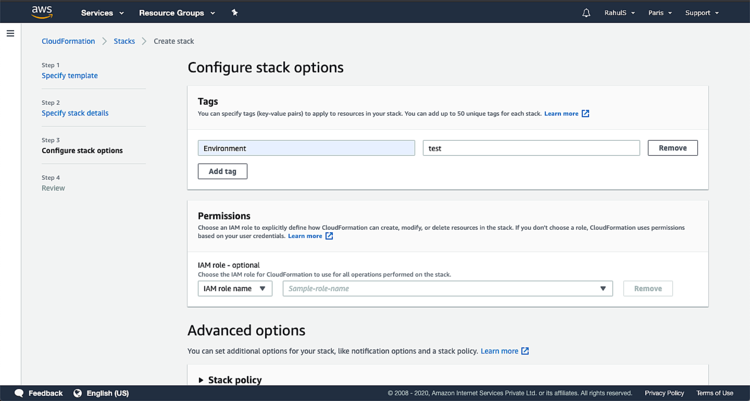
如有需要,请添加 Tags。
向下滚动页面并点击“Create stack”
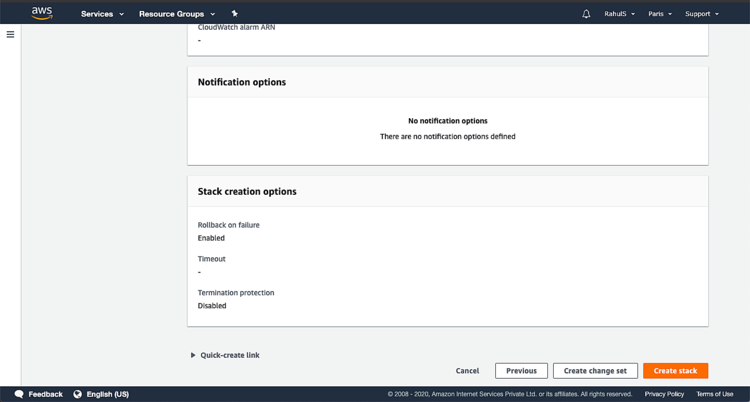
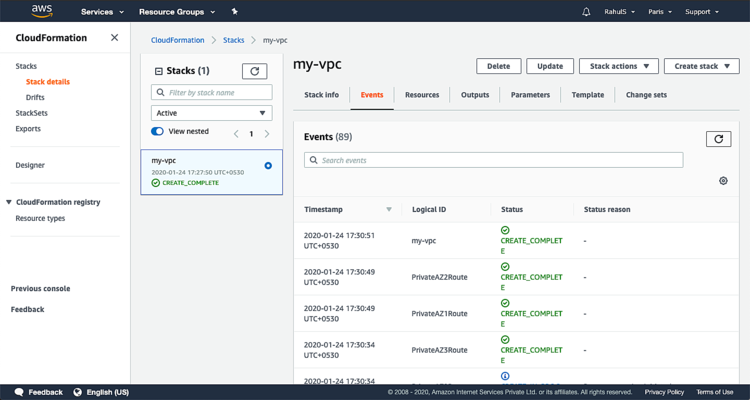
这将花费一些时间,请耐心等待。
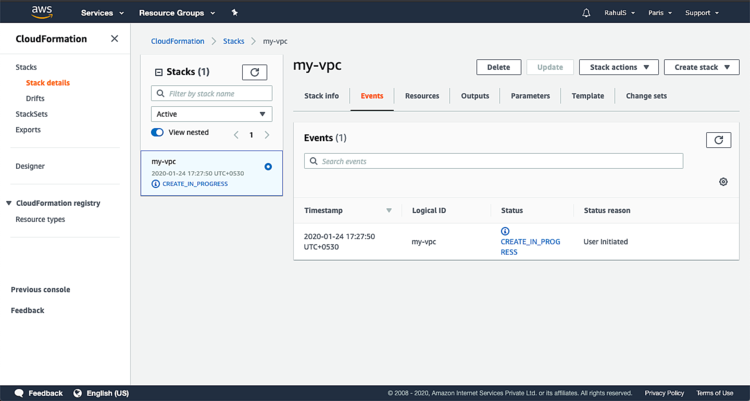
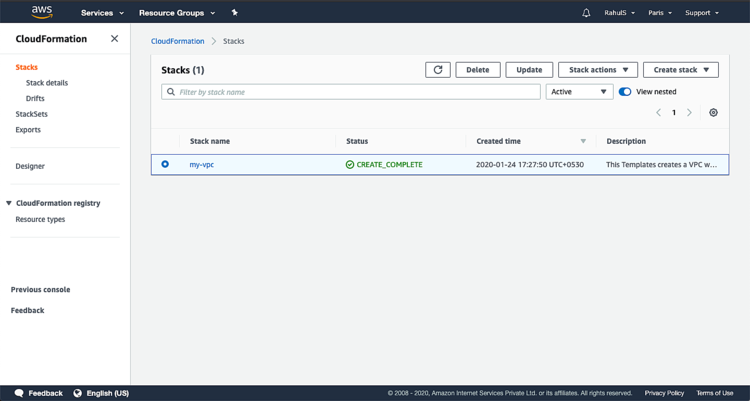
您可以在“Events”选项卡下查看正在发生的状态或事件。
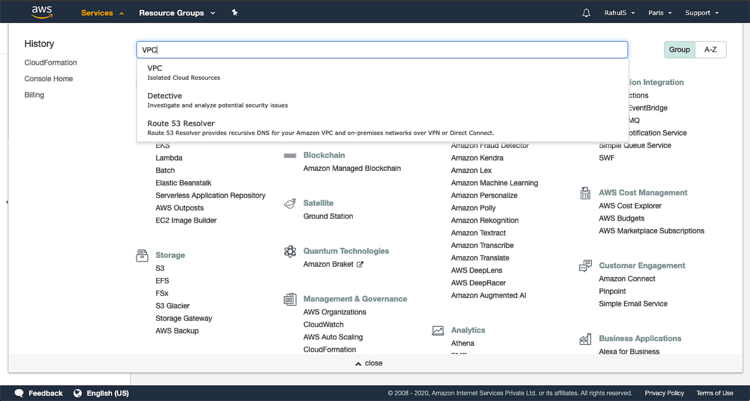
现在,您可以前往 VPC 查看已创建的 VPC。要前往 VPC,请点击顶部的“Services”,然后在左侧搜索 VPC。
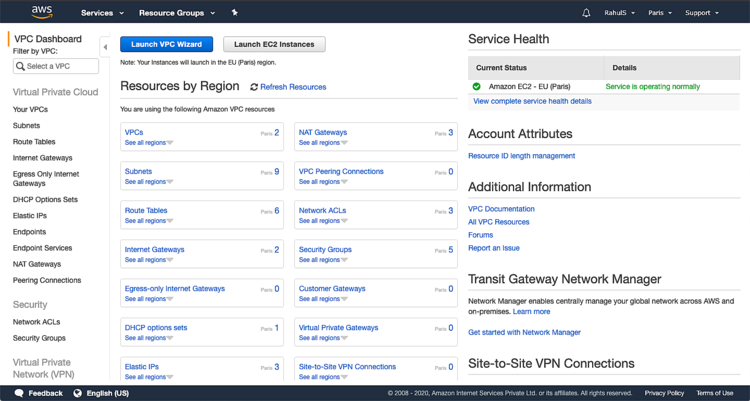
在主仪表板上,您可以看到已创建的 VPC、Subnets、Route Tables、Internet Gateway、Nat Gateway 的数量。
如果不再需要该 VPC,只需删除堆栈即可将其删除。
结论
在本文中,我们了解了创建 Cloudformation 堆栈以创建包含 2 个公有子网和 2 个私有子网的 VPC 的步骤。