
Linux中的lscpu命令是一个非常实用的工具,用于显示系统CPU架构的详细信息。执行该命令时,它会输出CPU数量、线程数、核心数、插槽数,以及CPU厂商、型号、主频和缓存大小等信息。该命令从多个系统文件(包括/proc/cpuinfo)中收集信息,并以人类可读的格式呈现。对于需要基于底层硬件评估或优化系统性能的系统管理员和开发人员来说,这个命令尤其有价值。
在进行演示之前,值得一提的是,本教程中的所有示例均在Ubuntu 24.04 LTS上测试通过。
Linux lscpu命令
Linux中的lscpu命令用于显示CPU架构信息。以下是该工具的语法:
lscpu [-a|-b|-c] [-x] [-s directory] [-e[=list]|-p[=list]]
lscpu -h|-V
以下是man页面对该命令的描述:
       lscpu  gathers  CPU  architecture  information from sysfs and /proc/cpuinfo.  The command
       output can be optimized for parsing or for easy readability by humans.  The information
       includes, for example, the number of CPUs, threads,  cores,  sockets,  and  Non-Uniform
       Memory  Access (NUMA) nodes. There is also information about the CPU caches and cache
       sharing, family, model, bogoMIPS, byte order, and stepping.

       Options that result in an output table have a list argument. Use this argument to customize
       the command output. Specify a comma separated list of column labels to limit the output
       table to only the specified columns, arranged in the specified order. See COLUMNS for a
       list of valid column labels. The column labels are not case sensitive.

       Not all columns are supported on all architectures. If an unsupported column is specified,
       lscpu prints the column but does not provide any data for it.
以下问答式的示例将帮助你更好地理解这个工具的使用方法。
Q1. 如何使用lscpu命令?
基本用法非常简单——你只需要运行"lscpu"命令,不需要任何选项。
lscpu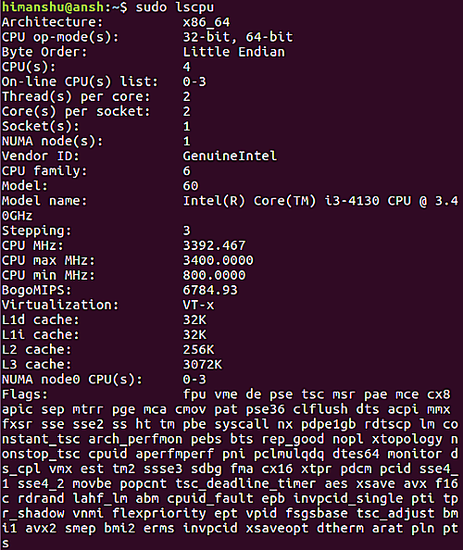
Q2. 如何让lscpu以易读的表格格式显示信息?
使用-e选项可以实现这一点。
lscpu -e以下是该命令的输出示例:

如果你需要,还可以将输出限制为特定的列。例如,以下命令将输出限制为CPU和NODE两列。
lscpu -e=cpu,node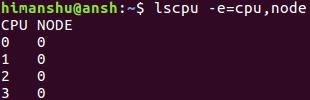
Q3. 如何将输出限制为仅在线或离线的CPU?
lscpu命令允许你将输出限制为仅在线或离线的CPU。你可以使用-b和-c命令行选项来实现。
lscpu -blscpu -c注意,这两个选项只能与-e或-p选项一起使用。
Q4. 如何让lscpu以易于解析的格式输出?
你可以使用-p命令行选项来实现。
lscpu -p以下是该命令的输出示例:
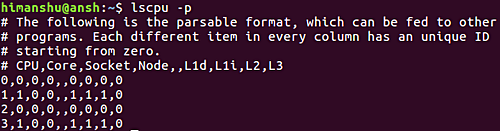
与-e选项类似,你也可以通过传递"list"参数来限制输出。
--parse[=list]
以下是man页面对"list"参数的描述:
If the list argument is omitted, the command output is compatible with earlier versions of lscpu.
In this compatible format, two commas are used to separate CPU cache columns. If no CPU caches are
identified the cache column is omitted.

If the list argument is used, cache columns are separated with a colon (:). When specifying the
list argument, the string of option, equal sign (=), and list must not contain any blanks or other
whitespace. Examples: '-p=cpu,node' or '--parse=cpu,node'.
Q5. 如何让lscpu使用十六进制掩码表示CPU集合?
默认情况下,lscpu以列表格式显示CPU集合(例如0,1)。但是,你可以使用-x命令行选项让lscpu使用十六进制掩码来表示CPU集合。
lscpu -x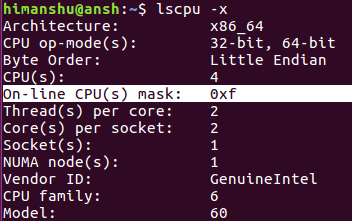
总结
和lshw一样,lscpu命令并不是你每天都会用到的工具,但在需要时它可能会帮你大忙。本教程中我们讨论了该工具的大部分功能(命令行选项),请多加练习,完成后可以查阅工具的man手册了解更多信息。