
在本页
- 先决条件
- 安装 Node.js
- 安装 Sails.js
- 启动 Sails.js 应用程序
- 为 Sails.js 创建 Systemd 服务文件
- 将 Nginx 配置为 Sails 应用程序的反向代理
- 配置防火墙
- 访问 Sails.js Web 界面
- 结论
Sails.js 是一个用于 Node.js 的 Javascript 框架。它用于非常快速地开发实时应用程序。它使你可以借鉴 Ruby on Rails 等框架的 MVC 架构。它附带了 blueprints,可帮助你在不编写任何代码的情况下快速启动应用程序的后端。它与其他前端兼容,包括 Angular、React、iOS、Android、Windows Phone、自定义硬件,或其他任何东西。
在本文中,我们将向你展示如何在 CentOS 8 上使用 Nginx 安装 Sails.js
先决条件
- 一台运行 CentOS 8 的服务器。
- 服务器上已配置 root 密码。
安装 Node.js
首先,使用以下命令安装所有必需的依赖项:
dnf install curl gcc-c++ make -y所有依赖项安装完成后,使用以下命令添加 Node 源仓库:
curl -sL https://rpm.nodesource.com/setup_16.x | bash -添加 Node 源仓库后,使用以下命令安装 Node.js:
dnf install nodejs -y安装完成后,使用以下命令验证 Node.js 版本:
node --version你应该会得到以下输出:
v16.4.0
安装 Sails.js
你可以使用如下所示的 NPM 命令安装 Sails.js:
npm -g install sails接下来,使用以下命令用 Sails.js 创建你的项目:
sails new myproject系统会要求你为应用程序选择一个模板:
 Choose a template for your new Sails app:
 1. Web App  ·  Extensible project with auth, login, & password recovery
 2. Empty    ·  An empty Sails app, yours to configure
 (type "?" for help, or <CTRL+C> to cancel)
? 2
输入 2 并按回车键安装应用程序。你应该会得到以下输出:
 info: Installing dependencies...
Press CTRL+C to cancel.
(to skip this step in the future, use --fast)

 info: Created a new Sails app `myproject`!
启动 Sails.js 应用程序
接下来,切换到 myproject 目录,并使用以下命令启动你的应用程序:
cd myproject
sails lift
你应该会得到以下输出:
 info: Starting app...

 info:
 info:                .-..-.
 info:
 info:    Sails              <|    .-..-.
 info:    v1.4.3              |\
 info:                       /|.\
 info:                      / || \
 info:                    ,'  |'  \
 info:                 .-'.-==|/_--'
 info:                 `--'-------'
 info:    __---___--___---___--___---___--___
 info:  ____---___--___---___--___---___--___-__
 info:
 info: Server lifted in `/root/myproject`
 info: To shut down Sails, press
 + C at any time.
 info: Read more at https://sailsjs.com/support.

debug: -------------------------------------------------------
debug: :: Thu Jun 24 2021 04:46:13 GMT-0400 (Eastern Daylight Time)

debug: Environment : development
debug: Port        : 1337
debug: -------------------------------------------------------
按 CTRL + C 停止应用程序。
为 Sails.js 创建 Systemd 服务文件
接下来,你需要创建一个 systemd 服务文件来管理你的应用程序。
你可以使用以下命令创建它:
nano /lib/systemd/system/sails.service添加以下几行:
[Unit]
After=network.target

[Service]
Type=simple
User=root
WorkingDirectory=/root/myproject
ExecStart=/usr/bin/sails lift
Restart=on-failure

[Install]
WantedBy=multi-user.target
保存并关闭文件,然后使用以下命令重新加载 systemd 守护进程:
systemctl daemon-reload接下来,启动 Sails 服务并使其在系统重启时启动:
systemctl start sails
systemctl enable sails
你可以使用以下命令检查 Sails 的状态:
systemctl status sails你应该会得到以下输出:
? sails.service
   Loaded: loaded (/usr/lib/systemd/system/sails.service; disabled; vendor preset: disabled)
   Active: active (running) since Thu 2021-06-24 04:47:07 EDT; 5s ago
 Main PID: 47388 (node)
    Tasks: 22 (limit: 25014)
   Memory: 148.1M
   CGroup: /system.slice/sails.service
           ??47388 node /usr/bin/sails lift
           ??47395 grunt

Jun 24 04:47:09 centos8 sails[47388]:  info:  ____---___--___---___--___---___--___-__
Jun 24 04:47:09 centos8 sails[47388]:  info:
Jun 24 04:47:09 centos8 sails[47388]:  info: Server lifted in `/root/myproject`
Jun 24 04:47:09 centos8 sails[47388]:  info: To shut down Sails, press
 + C at any time.
Jun 24 04:47:09 centos8 sails[47388]:  info: Read more at https://sailsjs.com/support.
Jun 24 04:47:09 centos8 sails[47388]: debug: -------------------------------------------------------
Jun 24 04:47:09 centos8 sails[47388]: debug: :: Thu Jun 24 2021 04:47:09 GMT-0400 (Eastern Daylight Time)
Jun 24 04:47:09 centos8 sails[47388]: debug: Environment : development
Jun 24 04:47:09 centos8 sails[47388]: debug: Port        : 1337
Jun 24 04:47:09 centos8 sails[47388]: debug: -------------------------------------------------------
此时,Sails 已启动并正在监听 1337 端口。
将 Nginx 配置为 Sails 应用程序的反向代理
建议安装 Nginx 并将其配置为你的 Sails 应用程序的反向代理。
首先,使用以下命令安装 Nginx 软件包:
dnf install nginx -y安装 Nginx 后,为 Sails 创建一个 Nginx 虚拟主机配置文件:
nano /etc/nginx/conf.d/sails.conf添加以下几行:
server {
 listen       80;
 server_name  sails.domain.com;
   location / {
     proxy_pass        http://localhost:1337/;
     proxy_set_header  Host $host;
     proxy_buffering   off;
   }
 }
完成后保存并关闭文件。
接下来,使用以下命令检查 Nginx 是否存在配置错误:
nginx -t你应该会得到以下输出:
nginx: the configuration file /etc/nginx/nginx.conf syntax is ok
nginx: configuration file /etc/nginx/nginx.conf test is successful
接下来,启动 Nginx 服务并使其在系统重启时启动:
systemctl start nginx
systemctl enable nginx
现在,使用以下命令检查 Nginx 服务的状态:
systemctl status nginx配置防火墙
接下来,你需要在防火墙中允许 80 端口。你可以使用以下命令允许它:
firewall-cmd --permanent --zone=public --add-port=80/tcp接下来,重新加载防火墙以应用更改:
firewall-cmd --reload完成后,你可以继续下一步。
访问 Sails.js Web 界面
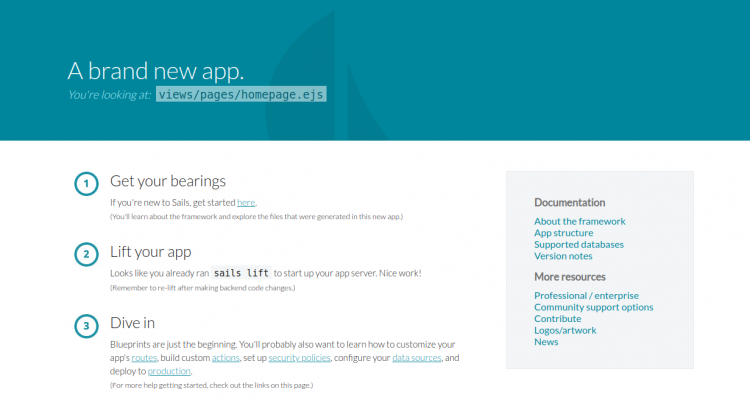
现在,打开你的 Web 浏览器,使用 URL http://salis.domain.com 访问 Sails.js Web 界面。你应该会在以下屏幕中看到 Sails.js 的默认页面:
结论
祝贺你!你已在 CentOS 8 上成功安装 Sails.js,并将 Nginx 配置为反向代理。现在你可以开始使用 Sails 开发实时应用程序了。