
本教程适用于以下操作系统版本
- Debian 12 (Bookworm)
- Debian 11 (Bullseye)
- Debian 10 (Buster)
本页内容
- 步骤 1:先决条件
- 步骤 2:更新系统
- 步骤 3:配置 Ntopng 软件仓库:
- 步骤 4:安装并配置 Ntopng
- 步骤 5:通过 Web 浏览器访问 Ntopng
- 结论
您是正在寻找轻量、易用、跨平台网络监控工具的系统管理员或网络工程师吗?那么 Ntopng 可能正是您所需要的工具。
Ntopng 是一款开源网络监控工具,可通过 Web 界面监控实时网络流量。Ntopng 是原始 ntop 的新一代版本。它是一款跨平台工具,几乎支持所有操作系统,包括 Windows、Unix/Linux、macOS 和 BSD。
Ntopng 提供许多功能,例如:
- 根据源地址和目的地址对流量进行过滤与排序
- 支持多种协议,包括 TCP、UDP、SMTP、ICMP、ARP、FTP、Netbios、SSH、Telnet 等
- 提供 IP 地址的地理位置定位
- 在检测到异常网络行为时生成警报与通知
- 通过 Web 界面轻松浏览并可视化流量数据
- 支持加密网络流量分析
- 利用深度包检测(Deep Packet Inspection)技术识别应用层协议(YouTube、Facebook、BitTorrent 等)。
在本文中,您将学习如何在 Debian 11 上安装 Ntopng。
步骤 1:先决条件
- 系统运行 Debian 11。
- 拥有 sudo 权限的用户
步骤 2:更新系统
在开始安装之前,建议先执行以下命令更新您的 Debian 基础系统:
sudo apt update -ysudo apt upgrade -y步骤 3:配置 Ntopng 软件仓库:
Ntopng 不属于 Debian 11 默认软件仓库的一部分,因此您需要在 Debian 系统上配置 Ntopng 仓库;为此,请运行以下命令:
wget http://apt.ntop.org/buster/all/apt-ntop.debsudo dpkg -i apt-ntop.deb上述命令将在您的系统中添加 “ntop.list” 仓库。接下来,执行以下命令使仓库更改生效:
sudo apt update -y步骤 4:安装并配置 Ntopng
在终端中运行以下命令以安装 Ntopng 软件包及其所需的依赖项:
Sudo apt install ntopng pfring-dkms nprobe n2disk cento -yNtopng 默认监听 3000 端口。您可以通过编辑 ntop.conf 来配置网络接口,并更改默认端口号及其他设置。
sudo vim /etc/ntopng/ntopng.conf现在,根据您系统的接口名称进行修改。此处可以指定多个接口名称。
#    -i|--interface
#    Specifies the network interface or collector endpoint to be used by ntopng for network.
-i=eth0
# -i=eth2
#    Sets the HTTP port of the embedded web server.
-w=3000
完成必要的修改后,保存并关闭文件。
您可以在一个单独的文件中指定网络 IP 范围。请在 Ntopng 根目录下创建一个名为 ntopng.start 的新文件。
sudo vim /etc/ntopng/ntopng.start如下所示添加您的网络 IP 范围:
--local-networks "192.168.0.0/24"  ## give your local IP Ranges here.
--interface 1
保存并退出文件。您需要重启 Ntopng 服务以使配置更改生效:
systemctl restart ntopng接下来,设置 Ntopng 服务开机自启动,然后使用以下命令验证服务状态:
sudo systemctl enable ntopngsudo systemctl status ntopng输出:
ntopng service - ntopng high-speed web-based traffic monitoring and analysis tool
Loaed: loaded (/etc/systemd/system/ntopng.service; enabled; vendor preset: enabled)
Active: active (running) since Tue 2023-02-28 16:45:28 UTC; 1min 0s ago
Process: 15335 ExecStartPre=/bin/sh -c /usr/bin/ntopng-utils-manage-config -a check-restore  && /usr/bin/ntopng-utils-manage-config -a resto
Process: 15350 ExecStartPre=/bin/sh -c /bin/cat /etc/ntopng/ntopng.conf > /run/ntopng.conf.raw (code=exited, status=0/SUCCESS)
Process: 15352 ExecStartPre=/bin/sh -c /bin/cat /etc/ntopng/ntopng.conf.d/*.conf >> /run/ntopng.conf.raw 2>/dev/null || true (code=exited, s
Process: 15354 ExecStartPre=/bin/sh -c /bin/sed "/^[ ]*-e.*$\|^[ ]*-G.*\|^[ ]*--daemon.*\|[ ]*--pid.*/s/^/#/" /run/ntopng.conf.raw > /run/nt
   Main PID: 15356 (ntopng-main)
   Tasks: 24 (limit: 525)
  Memory: 140.6M
     CPU: 9.146s
  CGroup: /system.slice/ntopng.service
          ??15356 /usr/bin/ntopng /run/ntopng.conf
Feb 28 16:45:29 debian11 ntopng[15356]: 28/Feb/2023 16:45:29 [startup.lua:35] Processing startup.lua: please hold on...
Feb 28 16:45:30 debian11 ntopng[15356]: 28/Feb/2023 16:45:30 [startup.lua:120] [lists_utils.lua:827] Refreshing category lists...
您可以通过以下命令验证系统中的 Ntopng 服务:
sudo ss -tnlp | grep ntopng输出应类似于以下内容:
LISTEN 0 4096 0.0.0.0:3000 0.0.0.0:* users:(("ntopng-main",pid=15356,fd=37))
步骤 5:通过 Web 浏览器访问 Ntopng
打开您的 Web 浏览器并输入 URL http://your-server-ip:3000。请注意,您需要将地址替换为您的系统 IP 地址加上端口号,随后您将被重定向到 Ntopng 登录页面:
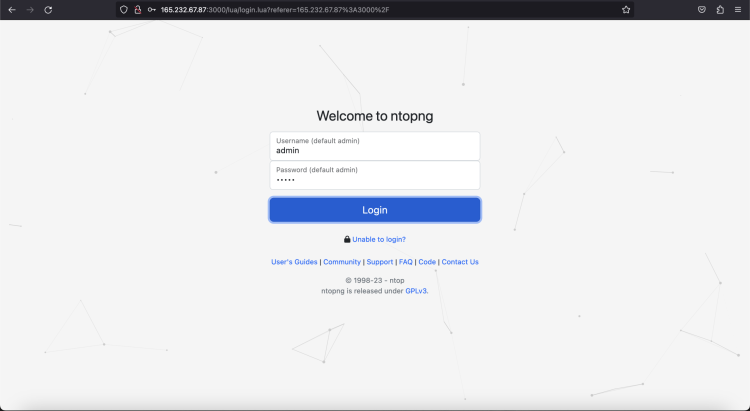
输入默认的用户名和密码 admin/admin,然后点击 Login(登录)按钮。您将看到如下截图:
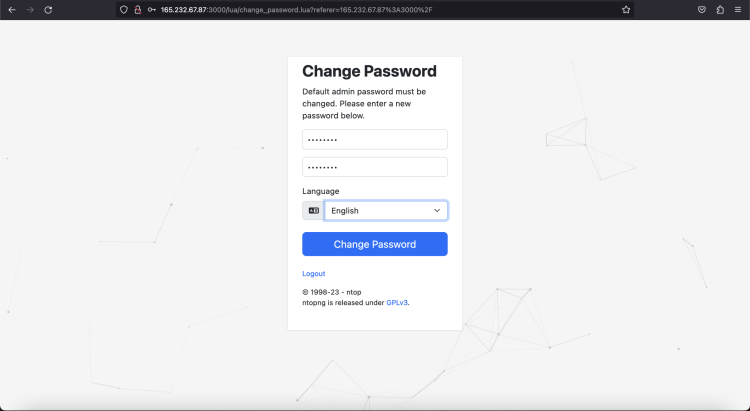
设置新密码并点击 “Change Password”(修改密码)按钮。您将看到如下截图所示的 Ntopng 默认仪表盘页面:
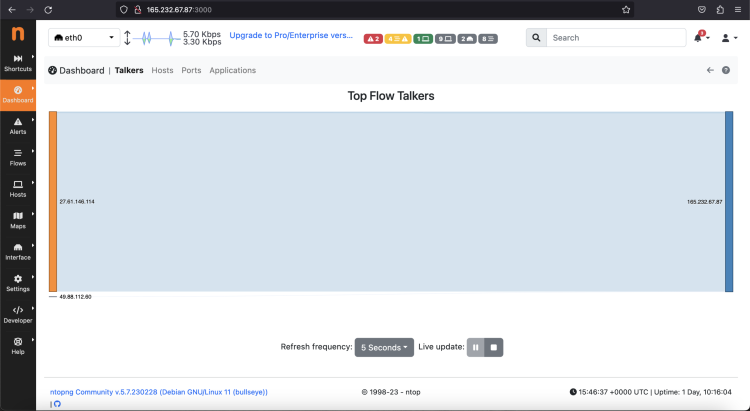
接下来,点击左侧的 Hosts > Hosts 选项,您将看到网络中所有可用主机的列表。
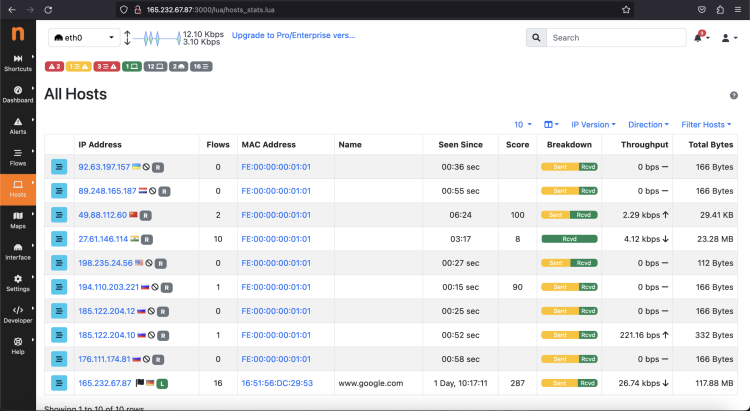
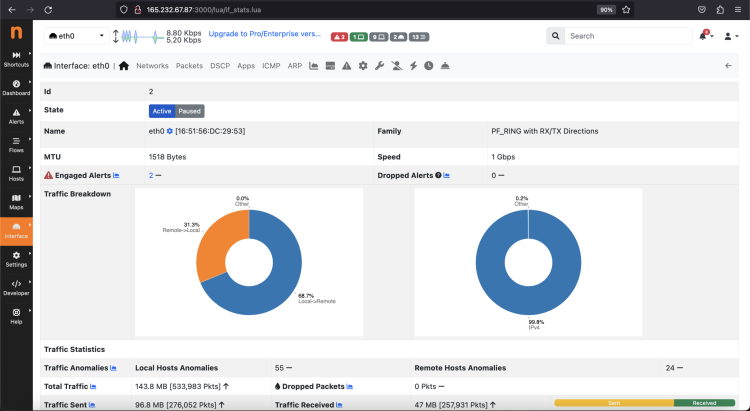
您也可以点击左侧面板的 interface > Details 选项来查看网络接口详情。
结论
恭喜!您已在 Debian 11 上成功安装 Ntopng。Ntopng 还提供许多其他选项,对实时监控网络流量和生成警报非常有帮助。您可以查看系统信息,也可以配置警报端点。如有任何疑问,欢迎向我提问。