
本页内容
- Linux taskset 命令
- Q1. 如何使用 taskset 获取进程的 CPU 亲和性?
- Q2. 如何使用 taskset 更改 CPU 亲和性?
- Q3. 更改亲和性时如何指定一段 CPU 范围?
- Q4. 如何以预定义的 CPU 亲和性启动进程?
- 总结
听说过「处理器亲和性」这个术语吗?它是一项允许你将进程绑定到某个特定的中央处理单元(或某一段 CPU)上、或解除这种绑定的功能。没错,你可以告诉系统应当使用哪一个(或哪几个)CPU 核心来运行某个特定的进程。关于处理器亲和性存在原因的理论细节,可查阅相关资料。
在本教程中,我们将讨论一个名为 taskset 的工具,它能让你实现处理器亲和性。不过在此之前,值得一提的是,本教程中的所有示例均已在 Ubuntu 22.04 LTS 机器和 Debian 11 上测试通过。
Linux taskset 命令
taskset 命令允许你设置或获取进程的 CPU 亲和性。其语法如下:
taskset [options] mask command [argument...]
taskset [options] -p [mask] pid
该工具的 man 手册页是这样解释的:
       taskset  is  used  to  set  or  retrieve  the CPU affinity of a running
       process given its pid, or to launch a new  command  with  a  given  CPU
       affinity.   CPU affinity is a scheduler property that "bonds" a process
       to a given set of CPUs on the system.  The Linux scheduler  will  honor
       the  given CPU affinity and the process will not run on any other CPUs.
       Note that the Linux scheduler also supports natural CPU  affinity:  the
       scheduler attempts to keep processes on the same CPU as long as practi?
       cal for performance reasons.  Therefore, forcing a specific CPU  affin?
       ity is useful only in certain applications.
       The CPU affinity is represented as a bitmask, with the lowest order bit
       corresponding to the first logical CPU and the highest order bit corre?
       sponding  to  the  last logical CPU.  Not all CPUs may exist on a given
       system but a mask may specify more CPUs than are present.  A  retrieved
       mask  will  reflect only the bits that correspond to CPUs physically on
       the system.  If an invalid mask is given (i.e., one that corresponds to
       no  valid  CPUs on the current system) an error is returned.  The masks
       may be specified in hexadecimal (with or without a leading "0x"), or as
       a CPU list with the --cpu-list option.  For example,
           0x00000001  is processor #0,
           0x00000003  is processors #0 and #1,
           0xFFFFFFFF  is processors #0 through #31,
           32          is processors #1, #4, and #5,
           --cpu-list 0-2,6
                       is processors #0, #1, #2, and #6.
       When  taskset returns, it is guaranteed that the given program has been
       scheduled to a legal CPU.
下面是一些问答式示例,可帮助你更好地理解 taskset 命令的工作原理。
Q1. 如何使用 taskset 获取进程的 CPU 亲和性?
如果希望 taskset 显示某个正在运行的进程的 CPU 亲和性,可按如下方式使用该命令:
taskset -p [PID]只需把 PID 替换为你要获取其 CPU 亲和性的那个进程的 ID 即可。例如,你可以通过 ps 命令获取某个进程的进程 ID。
ps aux进程 ID 位于 PID 这一列。
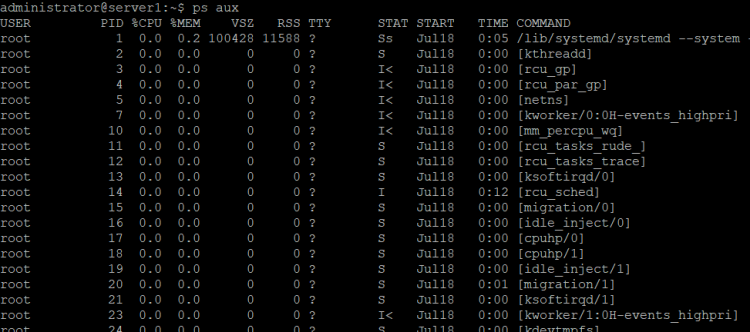
例如:
taskset -p 2363上述命令返回了如下输出:
pid 2363's current affinity mask: 3

因此,这里的十六进制值 '3' 表示该进程可以运行在 4 个处理器核心中的任意一个上:0、1、2、3。
如果希望输出以 CPU 范围的形式呈现,可以加上 -c 命令行选项。
taskset -cp 9726此时的输出如下:
pid 9726's current affinity list: 0-3
Q2. 如何使用 taskset 更改 CPU 亲和性?
要调整某个已有进程的 CPU 亲和性,你需要指定该进程的 ID(就像上一节所做的那样),并附上一个定义新亲和性的十六进制掩码。
例如,Gedit 进程(PID:9726)当前的 CPU 亲和性为 'f'。

要将亲和性改为 0x11,请使用以下命令:
taskset -p 0x11 9726随后,你可以再次使用以下命令查看新的亲和性:
taskset -p 9726下面的截图展示了在我的环境中这些命令的输出:

可以看到,亲和性已经发生了改变。
Q3. 更改亲和性时如何指定一段 CPU 范围?
这并不复杂。你所要做的,就是在上一节使用的命令上加上 -c 命令行选项,并把 CPU 核心范围作为输入一并给出。
示例如下:
taskset -cp 0,3 9726
此时产生的输出如下:
pid 9726's current affinity list: 0
pid 9726's new affinity list: 0,3
Q4. 如何以预定义的 CPU 亲和性启动进程?
没错,你也可以在启动时就为进程设定好 CPU 亲和性。
例如,我以 CPU 亲和性 0xa 启动了 gedit 文本编辑器。
taskset 0xa gedit
总结
诚然,taskset 命令并不面向普通的命令行用户。它主要由服务器端的专家用于在多核环境中进行进程优化。我们在这里讨论了该工具的基础用法。欲了解更多信息,请查阅其 man 手册页。