
有时会有多个用户登录到一台服务器计算机,而你——系统/网络管理员——需要,比如说,重启服务器以执行某些维护任务。当然,正确的做法是告知所有已登录的用户有关维护活动的信息。
值得庆幸的是,Linux 为此提供了一个内置的命令行工具。这个工具就是 wall 命令,在本教程中,我们将通过一些易于理解的示例来讨论这个工具的基础用法。不过在此之前,值得一提的是,本文中的所有示例都已在 Ubuntu 22.04 LTS 机器上测试过。
Linux wall 命令
如前所述,wall 命令用于向所有已登录的用户发送消息。其语法如下:
wall [-n] [-t TIMEOUT] [file]工具的手册页(man page)对其描述如下:
 Wall displays the contents of file or, by default, its standard input, on
 the terminals of all currently logged in users. The command will cut over
 79 character long lines to new lines. Short lines are white space padded
 to have 79 characters. The command will always put carriage return and
 new line at the end of each line.
 Only the super-user can write on the terminals of users who have chosen
 to deny messages or are using a program which automatically denies mes?
 sages.
 Reading from a file is refused when the invoker is not superuser and the
 program is suid or sgid.
以下是一些采用问答形式的示例,应该能让你很好地了解 wall 命令的工作方式。
Q1. 如何使用 wall 命令?
基本用法非常简单——只需执行 'wall' 命令,并在标准输入上写入你要发送的消息。写完后,使用 Ctrl+D 组合键告知命令你已经写完了消息。
wall例如,以下是文本通过 stdin 输入时的第一步:

以下是多次按下 Ctrl+D 后消息被广播时的第二步:
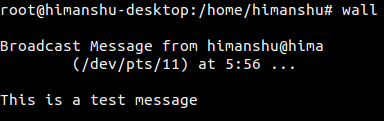
其他已登录用户看到的消息如下:
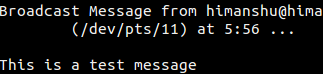
Q2. 如何去掉广播消息中的表头?
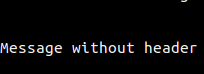
如果你想去掉广播消息中出现的表头,可以使用 -n 命令行选项来实现。
wall -n例如,以下操作:
wall -n
Message without header
^D
产生了如下输出:
Q3. 如何让 wall 从文件接受输入?
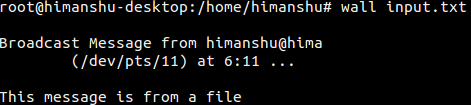
这可以通过将文件名作为 wall 命令的输入传入来实现。
wall [filename]例如:
wall input.txt其中 input.txt 包含如下一行内容:
This message is from a file

输出如下:
Q4. 还有哪些使用 wall 命令的方式?
你还可以用一些其他方式使用 wall 命令。例如:
echo "test message" | wallwall << .
> test message
> .wall <<< "test message"结论
总而言之,如果你是系统/网络管理员,且你的大部分工作涉及管理多人使用的无头服务器,那么 wall 命令是你必须掌握的。我们已经讨论了 wall 命令的大部分功能。想了解更多,请查阅该工具的 man page。也欢迎查看我们的 cd 命令教程。