
本页内容
- Linux xxd 命令有什么用途?
- Q1. 如何使用 xxd 命令?
- Q2. 如何用 xxd 跳过几行?
- Q3. 如何将 xxd 输出限制到特定长度?
- Q4. 如何设置列长度?
- Q5. 如何让 xxd 生成二进制转储?
- 结论
需要为文本文件生成十六进制转储吗?正在寻找一款能完成此任务的命令行工具?你很幸运,因为有一款名为 xxd 的命令可以帮你做到。在本教程中,我们将通过一些通俗易懂的示例来讲解 xxd。不过在此之前,值得一提的是,这里所有示例都已在 Ubuntu 22.04 LTS 机器上测试通过。
Linux xxd 命令有什么用途?
Linux 中的 xxd 命令可以让你创建 hexdump,甚至执行反向操作。以下是它的语法:
xxd [OPTIONS] [file]下面是该工具 man 手册页对它的说明:
xxd  creates  a hex dump of a given file or standard input.  It can also convert a hex dump back to its original binary form.  Like
uuencode(1) and uudecode(1) it allows the transmission of binary data in a `mail-safe' ASCII representation, but has the  advantage
of decoding to standard output.  Moreover, it can be used to perform binary file patching.
以下是一些问答形式的示例,应该能帮助你更好地理解 xxd 的工作原理。
Q1. 如何使用 xxd 命令?
很简单。例如,假设你有一个文本文件 'test.txt',其内容如下所示:
No.|Country|Yes/No
01|India|Y
02|US|Y
03|Australia|Y
04|China|N
05|Russia|Y
06|Japan|Y
07|Singapore|Y
08|South Korea|N
09|Finland|Y
10|Ireland|Y
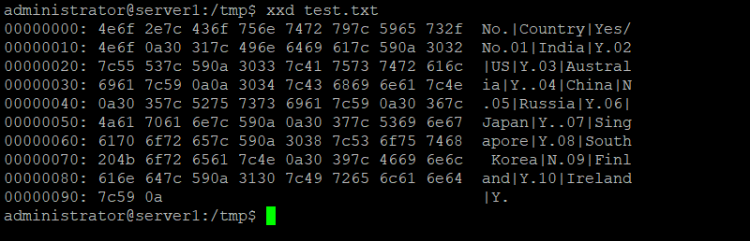
下面展示如何用 xxd 把文件内容转换成十六进制:
xxd test.txt输出如下:
00000000: 4e6f 2e7c 436f 756e 7472 797c 5965 732f  No.|Country|Yes/
00000010: 4e6f 0a30 317c 496e 6469 617c 590a 3032  No.01|India|Y.02
00000020: 7c55 537c 590a 3033 7c41 7573 7472 616c  |US|Y.03|Austral
00000030: 6961 7c59 0a0a 3034 7c43 6869 6e61 7c4e  ia|Y..04|China|N
00000040: 0a30 357c 5275 7373 6961 7c59 0a30 367c  .05|Russia|Y.06|
00000050: 4a61 7061 6e7c 590a 0a30 377c 5369 6e67  Japan|Y..07|Sing
00000060: 7061 6f72 657c 590a 3038 7c53 6f75 7468  paore|Y.08|South
00000070: 204b 6f72 6561 7c4e 0a30 397c 4669 6e61   Korea|N.09|Fina
00000080: 6c61 6e64 7c59 0a31 307c 4972 656c 616e  land|Y.10|Irelan
00000090: 647c 590a                                d|Y.
Q2. 如何用 xxd 跳过几行?
假设你不想要整个文件的十六进制转储,而是希望工具从某一特定行开始转换。这可以通过 -s 命令来实现。
例如,如果你想让 xxd 从第 3 行起生成十六进制转储,可以这样告诉 xxd:
xxd -s 0x30 test.txt产生的输出如下:
00000030: 6961 7c59 0a0a 3034 7c43 6869 6e61 7c4e  ia|Y..04|China|N
00000040: 0a30 357c 5275 7373 6961 7c59 0a30 367c  .05|Russia|Y.06|
00000050: 4a61 7061 6e7c 590a 0a30 377c 5369 6e67  Japan|Y..07|Sing
00000060: 7061 6f72 657c 590a 3038 7c53 6f75 7468  paore|Y.08|South
00000070: 204b 6f72 6561 7c4e 0a30 397c 4669 6e61   Korea|N.09|Fina
00000080: 6c61 6e64 7c59 0a31 307c 4972 656c 616e  land|Y.10|Irelan
00000090: 647c 590a                                d|Y.
可以看到,在这种情况下十六进制转储是从第 3 行开始生成的。
Q3. 如何将 xxd 输出限制到特定长度?
在上一节中,我们讨论了如何让 xxd 从特定位置开始转换。但也有办法把转换限制到特定位置,这可以通过 -l 命令行选项来实现。
例如,要确保 xxd 只为 test.txt 的前三行生成转储,可以像下面这样使用:
xxd -l 0x30 test.txt它产生的输出如下:
00000000: 4e6f 2e7c 436f 756e 7472 797c 5965 732f  No.|Country|Yes/
00000010: 4e6f 0a30 317c 496e 6469 617c 590a 3032  No.01|India|Y.02
00000020: 7c55 537c 590a 3033 7c41 7573 7472 616c  |US|Y.03|Austral
Q4. 如何设置列长度?
如果希望 xxd 在输出中生成更少或更多的列,可以使用 -c 选项并在其中指定列数。下面是使用该选项的示例命令:
xxd -c 5 test.txt输出如下:
00000000: 4e6f 2e7c 43  No.|C
00000005: 6f75 6e74 72  ountr
0000000a: 797c 5965 73  y|Yes
0000000f: 2f4e 6f0a 30  /No.0
00000014: 317c 496e 64  1|Ind
00000019: 6961 7c59 0a  ia|Y.
0000001e: 3032 7c55 53  02|US
00000023: 7c59 0a30 33  |Y.03
00000028: 7c41 7573 74  |Aust
0000002d: 7261 6c69 61  ralia
00000032: 7c59 0a0a 30  |Y..0
00000037: 347c 4368 69  4|Chi
0000003c: 6e61 7c4e 0a  na|N.
00000041: 3035 7c52 75  05|Ru
00000046: 7373 6961 7c  ssia|
0000004b: 590a 3036 7c  Y.06|
00000050: 4a61 7061 6e  Japan
00000055: 7c59 0a0a 30  |Y..0
0000005a: 377c 5369 6e  7|Sin
0000005f: 6770 616f 72  gpaor
00000064: 657c 590a 30  e|Y.0
00000069: 387c 536f 75  8|Sou
0000006e: 7468 204b 6f  th Ko
00000073: 7265 617c 4e  rea|N
00000078: 0a30 397c 46  .09|F
0000007d: 696e 616c 61  inala
00000082: 6e64 7c59 0a  nd|Y.
00000087: 3130 7c49 72  10|Ir
0000008c: 656c 616e 64  eland
00000091: 7c59 0a       |Y.
可以看到,输出中只生成了 5 列。
Q5. 如何让 xxd 生成二进制转储?
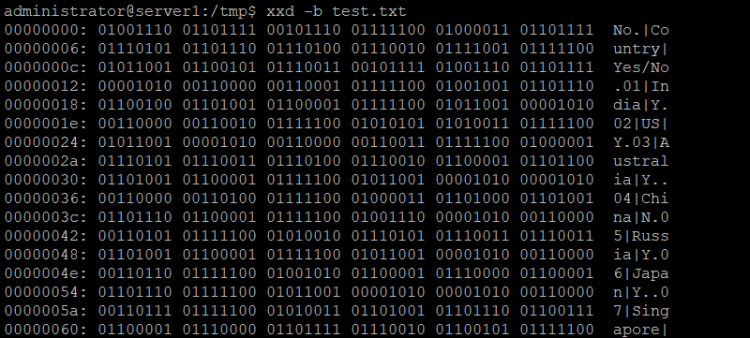
是的,这同样可以做到。-b 命令行选项会让 xxd 以二进制数字形式生成转储。下面是 man 手册页对该工具的说明:
-b | -bits
Switch to bits (binary digits) dump, rather than hexdump.  This option writes octets as eight digits "1"s and  "0"s  instead
of  a  normal  hexadecimal  dump. Each line is preceded by a line number in hexadecimal and followed by an ascii (or ebcdic)
representation. The command line switches -r, -p, -i do not work with this mode.
命令:
xxd -b test.txt示例如下:
结论
如你所见,如果你经常处理十六进制和二进制文件内容,xxd 命令会非常有用。在本教程中,我们只讨论了 xxd 提供的一些基本选项。练习完这些之后,可以查阅该工具的 man 手册页以了解更多。