
本页内容
- 前提条件
- 在 Debian 11 上安装 Chatwoot
- 访问 Chatwoot Web 界面
- 结论
Chatwoot 是一个免费、开源且实时的消息平台。它为你的网站提供简单易用的在线聊天,并将其与其他应用集成。它帮助你的企业通过社交媒体渠道为客户提供良好的客户支持。它可以轻松地与包括 Facebook、WhatsApp 和 Twitter 在内的社交媒体应用集成。它是 Intercom、Zendesk 等其他商业软件的一个很好的替代方案。
在本教程中,我将向你展示如何在 Debian 11 上安装 Chatwoot。
前提条件
- 一台运行 Debian 11 的服务器。
- 一个指向你的服务器 IP 的有效域名。
- 服务器上已配置 root 密码。
在 Debian 11 上安装 Chatwoot
开始之前,你需要从 Git 仓库下载 Chatwoot 安装脚本。
首先,使用以下命令安装 git 命令:
apt-get install git -y接下来,使用以下命令下载 Chatwoot:
git clone https://github.com/chatwoot/chatwoot.git接下来,切换到下载的目录,并使用以下命令安装 Chatwoot:
cd chatwoot/deployment/
bash setup_20.04.sh -O setup.sh
系统将要求你定义你的域名并为其配置 SSL,如下所示:
Would you like to configure a domain and SSL for Chatwoot?(yes or no): yes
Enter your sub-domain to be used for Chatwoot (chatwoot.domain.com for example) : chatwoot.linuxbuz.com

This script will try to generate SSL certificates via LetsEncrypt and serve chatwoot at
https://chatwoot.linuxbuz.com. Proceed further once you have pointed your DNS to the IP of the instance.

Do you wish to proceed? (yes or no): yes
Would you like to install postgres and redis?(Answer no if you plan to use external services): yes


Saving debug log to /var/log/letsencrypt/letsencrypt.log
Plugins selected: Authenticator nginx, Installer nginx
Enter email address (used for urgent renewal and security notices)
 (Enter 'c' to cancel):
[email protected]


- - - - - - - - - - - - - - - - - - - - - - - - - - - - - - - - - - - - - - - -
Please read the Terms of Service at
https://letsencrypt.org/documents/LE-SA-v1.2-November-15-2017.pdf. You must
agree in order to register with the ACME server. Do you agree?
- - - - - - - - - - - - - - - - - - - - - - - - - - - - - - - - - - - - - - - -
(Y)es/(N)o: Y

- - - - - - - - - - - - - - - - - - - - - - - - - - - - - - - - - - - - - - - -
Would you be willing, once your first certificate is successfully issued, to
share your email address with the Electronic Frontier Foundation, a founding
partner of the Let's Encrypt project and the non-profit organization that
develops Certbot? We'd like to send you email about our work encrypting the web,
EFF news, campaigns, and ways to support digital freedom.
- - - - - - - - - - - - - - - - - - - - - - - - - - - - - - - - - - - - - - - -
(Y)es/(N)o: Y
Account registered.
Requesting a certificate for chatwoot.linuxbuz.com
Performing the following challenges:
http-01 challenge for chatwoot.linuxbuz.com
Waiting for verification...
Cleaning up challenges
Subscribe to the EFF mailing list (email:
[email protected]
).

IMPORTANT NOTES:
 - Congratulations! Your certificate and chain have been saved at:
   /etc/letsencrypt/live/chatwoot.linuxbuz.com/fullchain.pem
   Your key file has been saved at:
   /etc/letsencrypt/live/chatwoot.linuxbuz.com/privkey.pem
   Your certificate will expire on 2022-06-04. To obtain a new or
   tweaked version of this certificate in the future, simply run
   certbot again. To non-interactively renew *all* of your
   certificates, run "certbot renew"
 - If you like Certbot, please consider supporting our work by:

   Donating to ISRG / Let's Encrypt:   https://letsencrypt.org/donate
   Donating to EFF:                    https://eff.org/donate-le

Job for nginx.service failed because the control process exited with error code.
See "systemctl status nginx.service" and "journalctl -xe" for details.


***************************************************************************
Woot! Woot!! Chatwoot server installation is complete
The server will be accessible at https://chatwoot.linuxbuz.com
***************************************************************************
Chatwoot 安装完成后,你可以使用以下命令检查 Chatwoot 的状态:
systemctl status chatwoot.target你将看到以下输出:
? chatwoot.target
     Loaded: loaded (/etc/systemd/system/chatwoot.target; enabled; vendor preset: enabled)
     Active: active since Sun 2022-03-06 06:07:21 UTC; 1min 36s ago

Mar 06 06:07:21 debian11 systemd[1]: Reached target chatwoot.target.
默认情况下,Chatwoot 监听端口 3000 。你可以使用以下命令检查它:
ss -antpl | grep 3000你将看到以下输出:
LISTEN 0 1024 0.0.0.0:3000 0.0.0.0:* users:(("ruby",pid=38128,fd=8))
Chatwoot 在安装过程中会安装并配置带有 Let's Encrypt SSL 的 Nginx。你可以使用以下命令检查 Nginx 的状态:
systemctl status nginx你将看到以下输出:
? nginx.service - A high performance web server and a reverse proxy server
     Loaded: loaded (/lib/systemd/system/nginx.service; enabled; vendor preset: enabled)
     Active: active (running) since Sun 2022-03-06 06:09:48 UTC; 10s ago
       Docs: man:nginx(8)
    Process: 38376 ExecStartPre=/usr/sbin/nginx -t -q -g daemon on; master_process on; (code=exited, status=0/SUCCESS)
    Process: 38377 ExecStart=/usr/sbin/nginx -g daemon on; master_process on; (code=exited, status=0/SUCCESS)
   Main PID: 38378 (nginx)
      Tasks: 3 (limit: 4679)
     Memory: 3.5M
        CPU: 61ms
     CGroup: /system.slice/nginx.service
             ??38378 nginx: master process /usr/sbin/nginx -g daemon on; master_process on;
             ??38379 nginx: worker process
             ??38380 nginx: worker process

Mar 06 06:09:48 debian11 systemd[1]: Starting A high performance web server and a reverse proxy server...
Mar 06 06:09:48 debian11 systemd[1]: Started A high performance web server and a reverse proxy server.
访问 Chatwoot Web 界面
现在,打开你的 Web 浏览器,并使用 URL http://chatwoot.linuxbuz.com 访问 Chatwoot Web 界面。你将被重定向到以下页面:
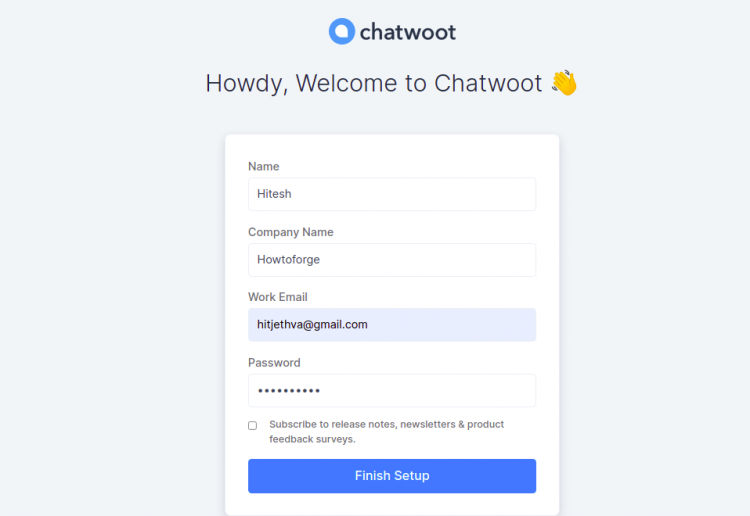
填写你的姓名、邮箱、公司名称、密码,然后点击 Finish Setup 按钮。你应该会看到 Chatwoot 登录页面:
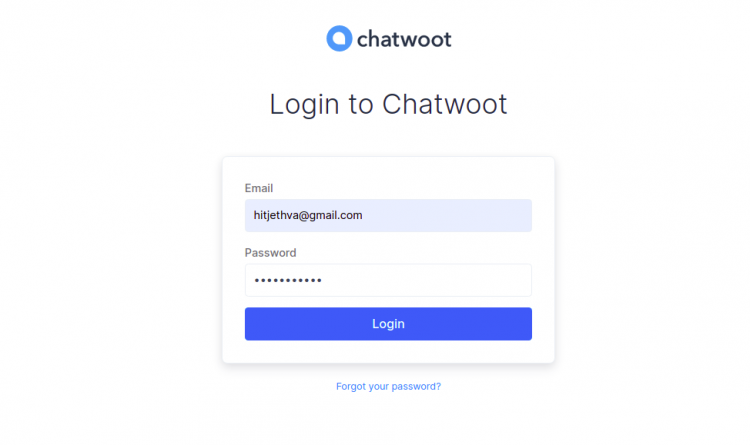
填写你的邮箱、密码并点击 Login 按钮。你应该会在以下页面看到 Chatwoot 仪表板:

点击 Inboxes 。你应该会看到以下页面:

在这里,你可以选择要与 Chatwoot 集成的渠道。
结论
恭喜!你已成功在 Debian 11 上安装 Chatwoot。现在你可以在你的组织中托管 Chatwoot,并用它来提供客户支持。如果你有任何问题,欢迎随时问我。